
Enterprise software licence optimisation aligns an organisation’s software entitlements and payments with actual use and business needs. It considers SaaS subscriptions, installed software and cloud services together, helping decision-makers understand how separate commitments fit within the wider technology estate. The goal is not simply to remove access, but to make informed choices about what the organisation holds and how it is used.
Fragmented records make it harder to understand commitments and spot gaps between entitlements and operational needs. Compare contract terms with usage and departmental requirements to review access, manage renewals and prepare for vendor discussions. Better visibility also supports consistent reporting and helps bring potential audit exposure into view.
This article explains how software licence optimisation works and how asset records, usage analysis and entitlements contribute. It also covers how to consider audit exposure and bring SaaS, licensed software and cloud into a more unified view. Connecting these elements can support clearer cost decisions and ongoing software governance.
Key Takeaways
- Bring software entitlements, payments, usage and business needs into one view to identify where they no longer align.
- Use software asset management to improve visibility of licences and support informed allocation decisions.
- Keep entitlement records and usage evidence organised to better manage audit exposure and renewal decisions.
- Assess SaaS, licensed software and cloud together to reveal gaps that separate systems can obscure.
- Treat licence optimisation as an ongoing governance process, not a one-off review.
What is Software Licence Optimisation?
Enterprise software licence optimisation aligns software entitlements and purchasing decisions with actual use and organisational requirements. It draws on asset records, application activity and vendor agreements to guide decisions about allocation, renewals and control. The aim is a defensible view of what the organisation owns, how rights are measured and whether those rights fit operational demand.
Software asset management and optimisation
Software asset management maintains records of software, entitlements, ownership and use. Software asset optimisation acts on those records to improve allocation. An inventory alone cannot show whether a licence still serves a business purpose. Compare assigned access with activity and role requirements, then record whether access should remain, move to another user or be reviewed against contract terms.
A utilisation measure can help frame that review: active licences divided by purchased licences, multiplied by 100. Interpret the result in context, since the vendor’s measurement rules and the application’s work patterns affect what counts as active.
Licence optimisation within IT asset management
Licence optimisation is the software-rights component of IT asset management, which connects software records with the wider estate and its business owners. This helps teams consider software alongside the devices, infrastructure and processes that support its use.
In a high-performance computing (HPC) batch environment, a denied job may signal an entitlement constraint, a configuration issue or limited capacity. Record the failure reason and compare it with the relevant licence terms before changing access. This helps the technical team and asset owner investigate the same incident without treating every denial as a licensing breach.
Managing multi-vendor licensing frameworks
Multi-vendor licensing management brings different agreements, measurement rules and renewal decisions into one governance process. This matters because a user, installation or workload can count differently under separate vendor frameworks.
Link each agreement to its product, entitlement metric, purchasing record and accountable owner. When a vendor changes a product bundle or access condition, record the change against the affected agreement and review its operational impact. This creates a traceable basis for comparing commitments without assuming one vendor’s terms apply to another.
Vendor comparisons, services and savings
Compare optimisation services by examining their assessment scope, evidence methods, contract expertise, reporting and decision records. A useful approach connects entitlements to actual use and explains each recommendation, rather than relying on an unsupported savings claim.
The main benefits are clearer allocation, better-informed renewals and fewer unmanaged entitlement mismatches. Measure savings against a documented spending baseline, recording which commitments changed and whether the change appears in subsequent purchasing records. This evidence helps distinguish realised reductions from proposed adjustments.
Software audit exposure and entitlement mismatches
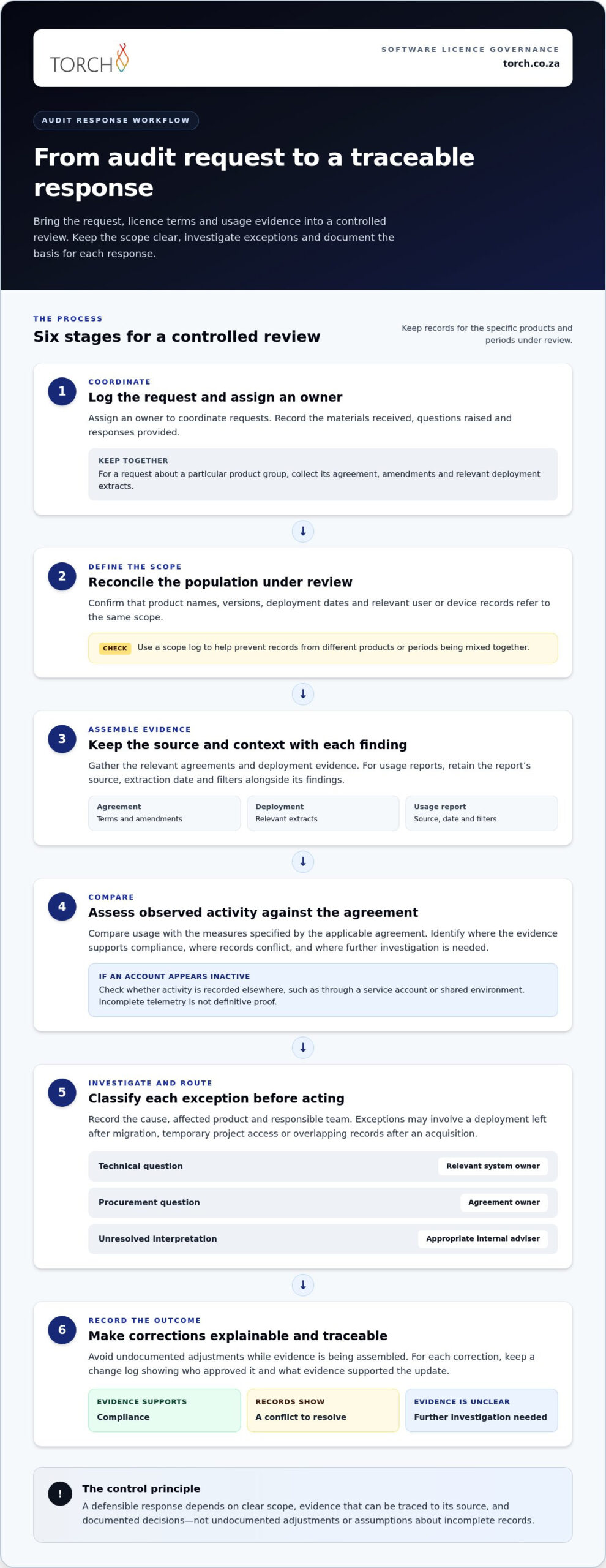
Audit exposure increases when an organisation cannot explain differences between its software records and the evidence a vendor requests. A defined response process helps teams assemble relevant records, investigate exceptions and keep decisions traceable.
Licence compliance and vendor audits
Licence compliance means using software in line with the rights and conditions in its agreement. During a vendor audit, teams may need to explain how those terms relate to deployment and access evidence.
Assign an owner to coordinate requests and record materials received, questions raised and responses provided. For example, if a request concerns a particular product group, keep its agreement, amendments and relevant deployment extracts together. A scope log helps prevent teams from mixing records from different products or periods.
Usage analysis and audit risk mitigation
Usage analysis compares observed activity with the measures specified by the applicable agreement. It helps teams identify where evidence supports compliance, where records conflict and where further investigation is needed.
Keep the report’s source, extraction date and filters alongside its findings. If an account appears inactive, check whether activity is recorded elsewhere, such as through a service account or shared environment. This avoids treating incomplete telemetry as definitive proof and gives reviewers a clear basis for discussing the result.
Entitlement mismatches can arise from different operational events. A deployment may remain after a migration, a project may retain temporary access, or an acquisition may introduce overlapping records. Classify each exception by cause, affected product and responsible team. This separates administrative clean-up from issues that need contract interpretation or technical investigation.
Before responding to an audit request, reconcile the specific population under review. Confirm that product names, versions, deployment dates and relevant user or device records refer to the same scope. Keep a change log for corrections, including who approved them and what evidence supported the update. This record helps explain why current figures differ from older extracts.
Mitigation also depends on a clear internal escalation path. Route technical questions to the relevant system owner, procurement questions to the agreement owner and unresolved interpretation issues to the appropriate internal adviser. Avoid undocumented adjustments while evidence is being assembled. A controlled process reduces confusion between teams and preserves a coherent account of decisions.
After an audit closes, record the findings, agreed actions and any changes to internal controls. For instance, repeated delays in removing access after role changes may justify updating the organisation’s access-change process. Treat the review as input to governance, not merely a one-off response to a vendor request.
Aligning software entitlements, payments, usage and needs
Alignment connects contract rights and payments with application use and departmental requirements. A reconciled view helps organisations distinguish unused access from licences that support essential work.
Usage data and licence reharvesting
Licence reharvesting uses application activity records to identify access that can be reassigned or removed. It helps teams distinguish dormant accounts from occasional but necessary use.
Compare sign-in records with role requirements and relevant licence terms. For example, an employee who changes departments may retain access to a former team’s application. Confirm the new role’s needs, then reclaim or reassign the seat through an approved process. Record the decision so later reviews can trace why access changed.
Fragmented data and spend visibility
Spend visibility brings contract terms, procurement records, invoices and usage into a shared view. When these records sit in separate systems, an inventory may omit purchases or show entitlements without their current cost.
For South African organisations, include POPIA in the monitoring design by identifying personal information in usage records, limiting access to appropriate roles and documenting retention decisions. Tool and service pricing models may use subscriptions, user or asset volumes, or defined service scope. In South Africa, pricing depends on the case and is provided after a quote request; scope, data sources and service requirements affect it.
Licence monitoring, analytics and optimisation tools
Monitoring tools combine software discovery, application activity, contract records and procurement data to support licence decisions. Software asset management tools can maintain an inventory, while analytics compare entitlements, consumption and spending.
Useful inputs include application administration consoles, device discovery records, purchase orders, invoices and renewal details. A reporting model can flag duplicate product entries or users with overlapping access. Treat each alert as a prompt for review: an inactive account may reflect leave, project cycles or an access method the monitoring tool cannot see.
Optimisation programmes and licence reduction
A licence optimisation programme establishes ownership, a reliable inventory, review criteria and recurring decisions. Start by selecting an application and reconciling its contracts and purchases, then match assigned access against activity and departmental requirements.
To reduce unused, duplicate or over-provisioned access, verify each finding with the relevant department before reclaiming it. Remove duplicate assignments, reallocate suitable seats and adjust future renewal quantities to documented demand. Track the action, approval and resulting commitment change, then repeat the review as usage or business needs shift.
Unified visibility across SaaS, licensed software and cloud
A unified view connects SaaS subscriptions, installed software and cloud consumption with ownership, contracts and business purpose. It helps decision-makers distinguish separate commitments and understand how they contribute to the organisation’s technology costs.
The central principle is consistent reporting, not forcing every asset into the same measurement model. A named-user subscription, a device-based licence and cloud consumption each require different usage evidence and contract terms.
Start with an inventory that identifies each application, service, vendor, owner and cost centre. Then link available contract and procurement records, usage data and invoices to the relevant entry. For example, connect a department’s SaaS subscription to its assigned users, renewal terms and expenditure records. For a cloud service, include consumption and allocation information.
This joined view helps reveal gaps that individual systems conceal. An application may appear in a procurement record but not the software inventory; a cloud charge may lack a clear owner; or an employee may have overlapping tools from separate departments. Matching these records adds context to each exception, allowing teams to investigate the cause before changing access or commitments.
Different services need different monitoring signals. For SaaS, review assigned accounts and application activity alongside subscription terms. For installed software, compare discovery records with the relevant licence metric. For cloud, examine consumption reports and allocation by service or business unit. Keep these measures distinct in reporting, even when presented together.
Continuous visibility depends on maintaining connections as contracts, users and services change. Record new purchases, renewals, cancellations and ownership changes in the appropriate system, then reconcile them with reporting. A renewal calendar can flag upcoming decisions, while variance reporting can highlight a charge that changed without a matching contract or usage explanation.
Integrated visibility also supports negotiations by giving procurement and IT a shared evidence base. Teams can explain which services support business needs, where overlapping commitments exist and how consumption has changed. That evidence can inform renewal quantities and contract discussions without assuming every low-use service should be removed.
Apply access controls to consolidated records, particularly where usage data identifies individual users. Clear ownership and appropriate permissions help protect sensitive operational information while keeping reporting useful to authorised decision-makers.
The practical takeaway is to connect records, preserve each service’s licensing logic and review changes continuously. This creates reporting that supports cost decisions and managed risk exposure across SaaS, installed software and cloud, rather than leaving each environment as a separate view.
Torch Services: Telecom Expense Management
Torch Services is a practical next step when licence reviews reveal wider IT cost governance gaps. Its Telecom Expense Management helps organisations examine telecom expenditure, while IT FinOps-as-a-Service supports broader IT financial management through invoice reconciliation and variance analysis against contracts and purchase orders.
The service also covers accruals, journals and recharges; budgeting and forecasting support; vendor and procurement engagement; and monthly IT finance packs in Excel and PowerBI. This can help teams connect spending records with purchasing decisions and improve visibility across IT costs. Automated user support and asset management services can complement that work where user requests or asset records affect cost allocation.
Torch’s track record includes R667.5M+ saved since 2004 across 12 African countries, providing concrete evidence of its IT cost management and optimisation experience.
For a discussion about your IT cost governance needs, contact Torch Services.
Make governance part of the next decision
Make software governance part of ordinary IT and procurement decisions, not a separate exercise before renewal. Assign clear ownership for entitlement records, usage evidence and contract changes so decisions remain traceable as requirements shift.
Enterprise software licence optimisation is most useful when its findings inform practical choices: whether access still supports a role, whether a renewal reflects current demand, and whether related technology costs have an accountable owner. Torch Services’ Telecom Expense Management, automated user support and asset management offering can support organisations addressing connected IT cost and asset governance needs.
Start with the area where clearer oversight would help your organisation make its next decision with greater confidence. A focused discussion can help define a suitable way forward.
Clear ownership and consistent review give your teams a sounder basis for action.
Frequently Asked Questions
What Is Enterprise Software Management?
When is the right time to start?
Start when a renewal, major purchase, restructuring or application rollout raises questions about existing software commitments. These moments bring contracts, usage and future requirements into focus. A department planning to replace a tool, for instance, can compare its current application with the proposed alternative before renewing both. For businesses rolling out operational systems with digital transformation and management platforms like Hajjaj.Pro, scoping user access during deployment avoids over-licensing from the outset. Starting early gives stakeholders time to clarify ownership, assess operational needs and prepare evidence for procurement discussions.
What is enterprise software license optimization?
Enterprise software licence optimisation aligns software rights and commitments with how an organisation operates. It helps decision-makers assess whether access, contract terms and business requirements still fit together. For example, a role change might leave an employee with access to applications no longer needed for their work. Reviewing that change as part of normal access governance keeps software decisions connected to organisational needs.
How do organizations audit software licenses and software usage?
Begin by defining the applications and business units in scope, then assign an owner to each review. Gather relevant agreements, purchase records, deployment information and application reports. Record the date and source of each data extract, since different systems can update at different times. Log exceptions with supporting evidence and their resolution. This creates a review trail stakeholders can revisit when a contract or deployment changes.
How do software licensing models differ across Microsoft, Oracle, SAP, and Adobe?
Microsoft, Oracle, SAP and Adobe agreements can use different entitlement terms and measurement rules, which may also vary by product and agreement. Some arrangements measure named users, devices, installations or consumption; others define access through subscriptions or specific contract conditions. Compare the actual agreement and product schedule rather than inferring rights from the vendor name. This helps teams avoid applying one product’s assumptions to another.
What software license audit risks and penalties should enterprises prepare for?
Audit risks arise when an organisation cannot explain how deployments, access or usage fit its contractual rights. The consequences depend on the relevant agreement, including its audit process and remedies, so a single penalty figure cannot describe every case. Prepare by preserving contract records, purchase evidence and dated system reports. Assign an owner to each unresolved variance, and document the basis for any correction or procurement decision.