
A software licence remains a business decision long after purchase. The software asset management lifecycle process gives organisations a way to track software from procurement and deployment through ongoing use, renewal and retirement, keeping licensing, installations and usage visible at each stage.
That visibility matters: without a clear record, it can be difficult to see what the organisation owns, how software is licensed or whether it is still needed. The software asset management lifecycle process links procurement decisions with day-to-day use and the eventual decision to renew, replace or retire software.
This guide explains the main stages of software asset management, from procurement and licensing to usage reviews, retirement and replacement. You’ll see how each stage supports informed decisions, clear accountability and alignment between software needs and spending in a South African business context.
Key Takeaways
- Connect capital planning and project budgets to lifecycle decisions so software investments remain aligned with operational needs.
- Build procurement visibility by recording software acquisition, deployment, licensing models and contract details in one process.
- Use usage and entitlement information to inform renewal, replacement and licence management decisions.
- Plan retirement as carefully as deployment, including secure media sanitisation and sustainable disposal.
- Torch’s asset-management service provides a full asset register, with every asset attributed to an owner and cost centre and tracked from procurement to decommission.
What Is the Software Asset Management Lifecycle (SAM)?
A software asset management lifecycle process governs software from planning and acquisition through deployment, operation, review and retirement. It connects investment decisions with inventory, licensing, compliance and disposal.
Lifecycle Stages from Planning to Disposal
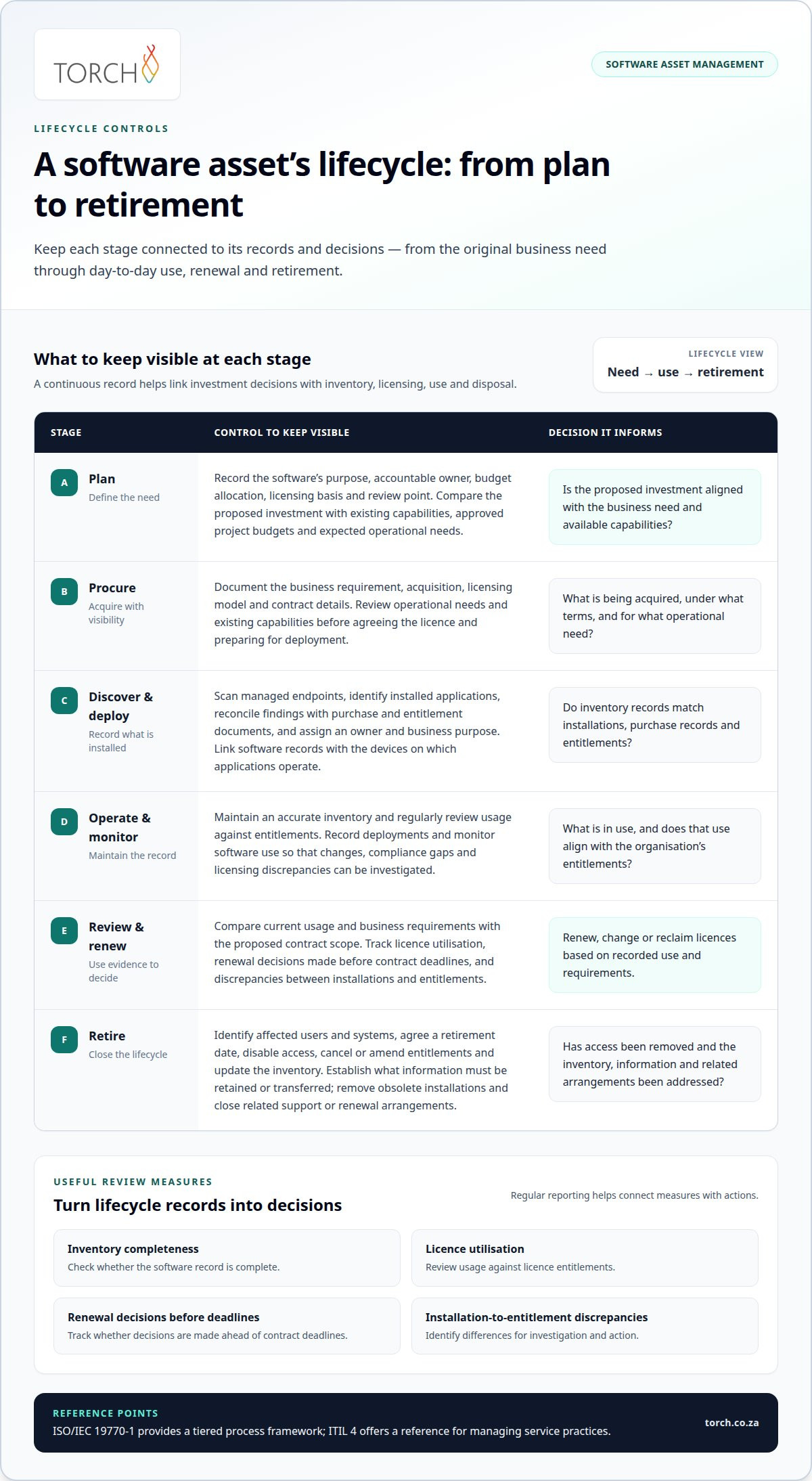
The lifecycle is the sequence of decisions that takes software from a business need to retirement. Each stage affects the next: planning identifies required capabilities, approval aligns acquisition with budgets, deployment records what is installed, and operational monitoring informs renewal or change decisions. At retirement, access is removed and records are updated. This end-to-end view helps prevent disconnected purchasing, unmanaged use and forgotten software.
Lifecycle Planning and Asset Valuation
Lifecycle planning sets out how software will be selected, funded, used, reviewed and retired. When planning capital expenditure, teams can compare a proposed investment with existing capabilities, approved project budgets and expected operational needs. Assess the asset across acquisition, use and retirement, not just at purchase. For example, a project plan can record the software’s purpose, accountable owner, budget allocation, licensing basis and review point, giving decision-makers a clearer basis for evaluating the investment.
Software Discovery and Inventory
Software discovery identifies applications across devices and environments; an inventory then records each finding in a structured register. Key steps are to scan managed endpoints, identify installed applications, reconcile records with purchase and entitlement documents, and assign an owner and business purpose. Linking discovery with unified endpoint management can help align software records with the devices on which applications operate. Accurate inventory supports better licence decisions and makes compliance gaps easier to investigate.
Management Best Practices and KPIs
Best practice means establishing clear roles, recording procurement and deployment decisions, and regularly reviewing usage against entitlements. ISO/IEC 19770-1 provides a tiered process framework for software asset management, while ITIL 4 offers a reference for managing service practices. Useful KPIs include inventory completeness, licence utilisation, renewal decisions made before contract deadlines, and identified discrepancies between installations and entitlements. Regular reports turn those measures into actions, such as reclaiming unused licences or correcting a licensing shortfall.
Asset Disposal and Replacement
Retirement closes an asset’s active lifecycle, but involves more than cancelling a subscription or removing a device. A controlled process connects the retirement decision to access removal, data handling, inventory updates and replacement planning.
Software Retirement and Disposal
Software retirement is the managed withdrawal of an application, its licences and associated access from operational use. Forgotten accounts or active installations can leave unnecessary access and licensing records behind. Identify affected users and systems, agree on a retirement date, disable access, cancel or amend entitlements, and update the inventory.
Record the decision, responsible owner, affected software and completion of each action. If an application stores business information, establish what must be retained and how it will be transferred before access ends. Then remove obsolete installations and close related support or renewal arrangements. This sequence helps maintain operational continuity and accurate records.
Sustainable Disposal and Replacement
Sustainable disposal considers whether an asset can be reused, refurbished, recycled or must be discarded, while replacement planning evaluates the next operational need. This matters because an early replacement can create avoidable expenditure, whilst delaying a needed change can affect capability and support. A laptop usually operates efficiently for 3-5 years, so condition, performance and business requirements should inform its review.
For storage media leaving service, sanitisation must match the sensitivity of the information and the intended next use. The National Institute of Standards and Technology provides guidance for establishing media sanitisation programmes in NIST SP 800-88 Revision 2. Record the method used, the asset identifier and the disposal outcome. This creates a traceable record rather than treating data removal as an informal final step.
Coordinate replacement with renewal dates and project budgets. Before renewing software, compare current usage and business requirements with the proposed contract scope; before replacing equipment, confirm that the new asset supports the required capabilities. In an illustrative scenario, a team planning to retire an application should map its users, dependencies and data first, then sequence migration, access closure and licence action. Discuss lifecycle governance when disposal records, renewal decisions and replacement plans need closer coordination.
Procurement Visibility and Licensing Models
For South African organisations, software use is governed by vendor licence terms, while data-protection controls should reflect the information being handled. Manage both through procurement records, an accurate inventory, contract details and tools that track software deployments and entitlements.
Software Procurement and Acquisition
Software procurement is the controlled process of acquiring an application, agreeing its licence and preparing for deployment. Visibility at this stage helps prevent teams from buying overlapping capabilities or accepting terms without understanding operational needs.
A practical acquisition sequence starts with a documented business requirement and a review of existing software. Shortlist 2-3 vendors for pricing, then compare their proposed functionality, licensing basis, support terms and fit with current systems. Before approval, record the budget owner, intended users, deployment scope and purchase authority. This creates a clear handover from procurement to the team managing the software.
Licensing models determine what the organisation can use and how its entitlement is measured. Subscription agreements typically provide access for a defined period; perpetual licences generally permit continued use under the contract’s conditions. Other agreements may count named users, devices or concurrent access. Match the model to expected use and record its limits before deployment.
Procurement and Contract Management
Contract management connects each software agreement to purchase, deployment and renewal decisions. Without contract terms, an inventory cannot reliably show whether installations and usage match entitlements.
Maintain a contract record showing the vendor, product, licence model, permitted scope, renewal date and responsible owner. Link it to purchase orders and deployment records, then review it when teams expand access or add modules. A central register makes commitments visible across departments and gives renewal planning a documented basis.
Discovery tools identify installed applications, while licence-tracking tools reconcile those findings with recorded entitlements. Reports flag discrepancies for investigation and support compliance reviews. Procurement platforms or shared contract registers can complement discovery, but every record needs an accountable owner and a defined update process.
For example, if a department requests an application already used elsewhere, procurement can compare its requirements with existing agreements before buying. The outcome may be a new purchase, a permitted reassignment or a discussion with the vendor. Record the decision and deployment so later reviews reflect what the organisation approved.
Software Asset Management Definition and Lifecycle
A practical challenge in software asset management is determining how software records relate to contractual rights. A product name alone may not identify the licensed edition, usage metric or conditions attached to an agreement. These distinctions shape how teams assess their position and decide which records need further analysis.
Software titles also need consistent classification. A publisher may use different names for a product, suite or version across invoices, installation data and contract documents. Normalising these records helps prevent apparent mismatches from being mistaken for confirmed compliance issues, while ensuring genuine differences are not hidden by inconsistent naming.
A focused reconciliation can examine several evidence points:
- Product identity: Match publisher, product, edition and version across relevant records.
- Licence metric: Identify whether the agreement measures named users, devices, concurrent use or another basis.
- Usage rights: Review contract conditions that may affect virtual environments, reassignment or access by different user groups.
- Evidence quality: Distinguish signed agreements and purchase records from estimates or incomplete operational data.
- Exceptions: Document unresolved differences, their owners and the evidence needed to reach a decision.
For example, an application installed on a shared workstation may be measured differently from individual user access. The relevant agreement determines how to assess that use. Recording the interpretation and supporting evidence helps teams apply decisions consistently, especially when several departments use the same software.
Good SAM governance also makes uncertainty visible. A record can distinguish a confirmed entitlement from a pending contract interpretation, rather than presenting both as equally reliable. That distinction supports more disciplined decision-making: procurement can address contract questions, application owners can clarify business use, and IT teams can provide operational context.
The central discipline is to connect each conclusion to its supporting evidence. This makes software decisions easier to explain and strengthens management reporting.
Torch’s ITAM Asset-Management Service
Torch Services provides an asset-management service for organisations that need a dependable view of technology assets and their associated costs. Torch is independent, carrier-agnostic and vendor-neutral, with no carrier commissions. Its ITAM work centres on a full asset register, with every asset attributed to an owner and a cost centre. Lifecycle tracking runs from procurement to decommission, connecting asset records with financial accountability.
A fragmented register can make it difficult to establish who owns an asset, where its cost belongs or what stage it has reached. Torch’s approach brings these details into a structured view, supporting decisions about deployment, ongoing use, replacement and retirement. It is useful when asset information is spread across disconnected records or lifecycle events do not reliably update the organisation’s view.
Procurement starts the record; it does not end at purchase. As an asset moves through its lifecycle, tracking links it to an accountable owner and cost centre. This gives teams a clearer basis for reviewing allocation and status, while keeping procurement and decommissioning visible in the same lifecycle view.
- At procurement: Record the asset and connect it with its owner and cost centre.
- During use: Maintain lifecycle tracking so the register reflects the asset’s operational status and accountability.
- When requirements change: Use the recorded ownership and cost allocation to inform decisions about continued use or replacement.
- At decommission: Update the lifecycle record so the asset’s status and cost-centre attribution remain clear.
ITAM, UEM and FinOps connect in one view, with every asset tied to an owner and cost centre. This helps relate asset records to endpoint management and IT cost governance rather than treating them as separate information sets. For example, when reviewing an asset’s ongoing use, a team can consider its ownership, allocation and lifecycle status together.
This service is useful when procurement records, operational asset information and cost allocation need to come together in a consistent register. It supports informed lifecycle decisions by making an asset’s history and accountability easier to follow, from acquisition through decommissioning. The result is a more coherent basis for managing the technology estate and its associated expenditure.
Contact Torch Services to discuss your asset-management requirements.
Make Lifecycle Governance an Ongoing Practice
A well-governed software asset management lifecycle process makes ownership part of routine operational decisions, not an occasional review. Assigning responsibility for updates and decisions keeps governance connected to changing business needs rather than reducing it to record-keeping.
When internal teams need a consistent view of technology assets and associated expenditure, Torch’s asset-management service supports lifecycle tracking. Its Telecom Expense Management service can address related operational needs. Start by identifying where ownership, cost allocation or lifecycle records are hardest to manage, then focus attention there.
A considered governance approach gives teams a practical foundation for improving visibility and making informed decisions over time. With clear ownership and regular reviews, your organisation can strengthen control as its technology needs evolve.
Frequently Asked Questions
How does software licence metering work?
Licence metering translates recorded activity into the unit defined by the agreement. For example, a user-based metric may count distinct accounts, while a concurrent-use metric measures simultaneous sessions. Before interpreting a report, confirm its period, data source and treatment of inactive or duplicate accounts. A metering result is evidence to review, not necessarily a complete measure of contractual position; the agreement’s definitions determine how to interpret activity.
What are the 5 phases of an asset’s life cycle?
Organisations may use different asset lifecycle models, with stages such as planning, acquisition, operation, maintenance and disposal. It applies broadly to assets, including equipment, and organisations can adapt the labels to their governance model. For example, a laptop’s maintenance phase might include repairs and condition reviews, while disposal records its final handling. Distinguishing maintenance from routine operation helps teams make replacement decisions based on asset condition and business needs, not age alone.
What is licence compliance?
Licence compliance means aligning software use with the rights and conditions in the organisation’s agreements. A practical review distinguishes confirmed exceptions from data-quality issues. For instance, an account assigned to a former employee may need investigation before it is treated as unauthorised use. Record the evidence, decision and corrective action together so the organisation can explain how it resolved the finding and prevent recurrence.
What is the difference between ITAM and SAM?
ITAM manages the broader technology estate; SAM focuses on software-specific records and rights. Consider a business application used on a company laptop: ITAM provides the device context, while SAM examines the application’s agreement and use. This distinction helps teams direct questions to the right owner. A device-allocation issue may sit with ITAM, while uncertainty about software entitlement belongs in the SAM review.
What are the stages of the software asset management lifecycle?
Organisations commonly describe software lifecycle stages as planning, acquisition, deployment, operation, review and retirement. The useful distinction is between an activity and a decision gate. For example, a renewal review should determine whether business need, usage evidence and agreement terms support continuing the service. Recording the decision, rationale and approver creates an auditable management record, rather than just a timeline of software events.
How do organisations track software licences and usage?
Reconcile data from application discovery, user or device activity, and entitlement records, then investigate exceptions. A practical control is to group findings by application and assign each discrepancy to an accountable owner. For example, resolve a product-name mismatch by comparing the publisher’s invoice description with the relevant agreement. Record the resolution and update the source record to prevent the same exception from reappearing in later reports.