
What if retiring a device leaves a security risk behind? Secure IT asset decommissioning means taking equipment out of active use, removing it from the network, sanitising any data it holds and recording its final status. Simply switching off a device or deleting files does not complete the process.
It is reasonable to focus on data erasure, but retirement also depends on knowing which assets are leaving service, what information they may hold and where they will go next. Gaps in the inventory or sanitisation records can make it difficult to demonstrate that an asset was handled securely.
This guide explains how to plan an IT asset’s retirement, select and verify an appropriate data-sanitisation method, and keep records that track each device through reuse, resale or recycling. It also explains how lifecycle management can clarify asset ownership and status, helping South African organisations manage security exposure and make informed decisions about retired equipment.
Key Takeaways
- Plan retirement around each asset’s purpose, ownership and data, not simply its replacement date.
- Use an appropriate sanitisation method and retain verification evidence; NIST SP 800-88 provides guidance for sanitising data on IT assets.
- Record each asset’s status, sanitisation method and responsible personnel to support traceability through its final disposition.
- Link assets to owners and cost centres in a register that follows them from procurement to decommission.
- See how Torch’s asset-management service can support lifecycle tracking and clearer oversight of IT assets.
How do I verify that data has been properly sanitised?
Use a defined process to select a sanitisation method, verify its result and retain evidence. NIST SP 800-88 provides guidance for data sanitisation of IT assets, according to the National Institute of Standards and Technology (NIST).
-
Choose a data sanitisation method
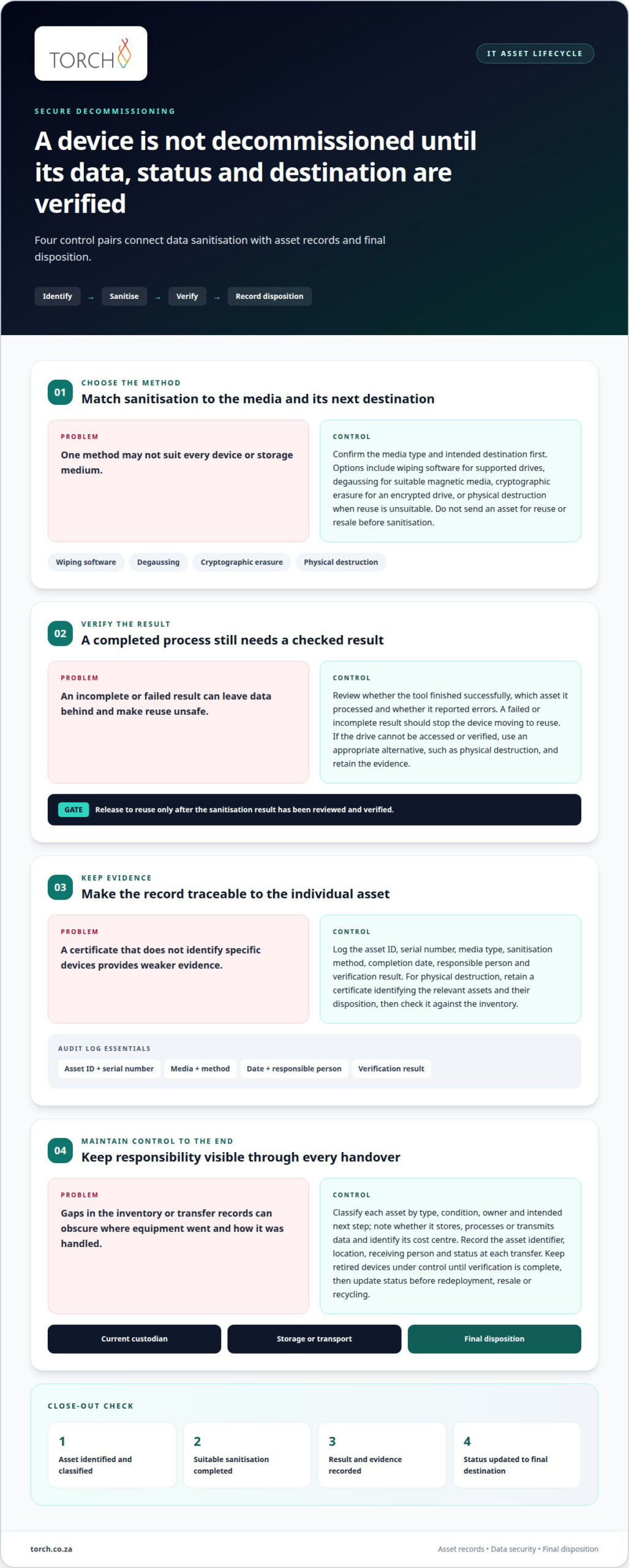
Match the method to the storage media and its intended destination. Use wiping software for supported drives, degaussing for suitable magnetic media, or physical destruction when reuse is unsuitable. Cryptographic erasure may be appropriate for an encrypted drive. Do not assume one method works for every device: confirm the media type first, and do not send an asset for resale or reuse before sanitisation.
-
Verify data erasure
Complete the sanitisation process and review its verification result before releasing the device. Record whether the tool finished successfully, which asset it processed and whether it reported errors. A failed or incomplete result should prevent the device from moving to reuse. If a drive cannot be accessed or verified, direct it to an appropriate alternative, such as physical destruction, and retain the resulting evidence.
-
Record destruction evidence
Record the asset ID, serial number, media type, sanitisation method, completion date, responsible person and verification result in an audit log. For physical destruction, retain a certificate of data destruction that identifies the relevant assets and records their disposition. Check the certificate against the inventory: a certificate that does not identify specific devices provides weaker evidence than one linked to each asset.
-
Align handling with data sensitivity
Classify the information and consider how the asset was used before choosing a method. For example, a device containing sensitive customer or financial records may need stricter handling than equipment with no data-bearing media. During a data-centre refresh, coordinate sanitisation with migration and shutdown plans. Keep retired devices under control until verification is complete, then update their status before redeployment, resale or recycling.
What Is Secure IT Asset Disposal?
Secure disposal brings asset records, data security and equipment handling together. A clear process helps teams track each device to its final destination.
-
Classify end-of-life assets
Start with an accurate inventory of equipment reaching end of life, then classify each asset by type, condition, owner and intended next step. For example, distinguish laptops that may be redeployed from devices intended for recycling. Record whether equipment stores, processes or transmits data, and identify its cost centre. This gives asset management teams a sound basis for deciding how to handle each item.
-
Track assets through the chain of custody
Record each transfer from the current custodian through storage, transport and final disposition. Include the asset identifier, location, receiving person and status at each handover. For critical equipment, reconcile dispatch records with receipts and disposition reports. After removal, update the inventory and monitor for unexpected impacts, such as a retired device still appearing on the network or supporting a business process.
-
Assess disposal costs and risks
In South Africa, disposal costs depend on factors such as asset type and quantity, data-handling needs, transport and the chosen destination. There is no single cost for every project. Improper decommissioning can expose sensitive information, cause data or service loss, disrupt operations or make it harder to restore a safe state. Assess these risks alongside the financial implications before deciding how to handle equipment.
-
Plan e-waste and hazardous-material handling
Identify electronic waste and any components that need specific handling before arranging collection. Keep their status and intended destination clear in the inventory, and assess the receiving recycler’s security practices and data-handling procedures. Request records showing completed disposition and, where applicable, environmental compliance. Reconcile these records against the collected equipment so the organisation can account for e-waste and other identified components through final processing.
A secure decommissioning process brings data security, asset management and equipment handling into one continuous view. Before making decisions, organisations should identify their assets and validate records of each asset’s purpose and, where appropriate, the data it processes, stores or transmits. This helps teams base handling decisions on a reliable understanding of the equipment and its role. The process should also account for transfers between individuals or teams, keeping responsibility visible as assets move. For sensitive or valuable assets, organisations can use more detailed chain-of-custody tracking where needed, with oversight suited to the asset.
Decommissioning does not end when equipment leaves its previous role. Organisations should update asset inventories after decommissioning and continue monitoring for unforeseen impacts. Current records and consistent tracking provide a clearer view of each asset’s status and destination. IT asset disposition can help organisations manage risk, recover value, support sustainability goals and improve IT operations. These outcomes depend on treating security, asset records and equipment disposition as connected concerns, rather than viewing the final handover in isolation. A consistent approach also gives organisations a basis for reviewing how assets were handled and whether their recorded status reflects what happened.
Asset status updates and audit documentation
Close each retirement with a status update and evidence trail. The records should link the asset’s identity, handling and final disposition.
-
Audit disposition providers
Assess a provider’s qualifications, security practices and data-handling procedures before assigning it sensitive information or equipment. Confirm how its processes cover collection, transport, sanitisation or destruction, and final disposition. For off-site work, establish which records the provider returns and how it reports discrepancies. A provider’s summary should not replace your internal asset record: reconcile its report against the equipment sent and the outcome received.
-
Collect disposal certificates and records
Gather the certificate of data destruction, sanitisation logs and any disposition report for each relevant asset. Record the asset ID, serial number, media type, sanitisation method, date and time, responsible person or vendor, and verification result. For transported equipment, retain the transport reference and final disposition. Match records to identifiable assets instead of filing a batch certificate that does not specify which components it covers.
-
Maintain compliance evidence
Map each record to the organisation’s applicable policies and requirements, which can vary by industry and region. ISO 27001 is one framework identified for post-disposal tracking and compliance evidence. Keep approvals, condition reports, wiping logs and certificates together in a controlled record set. Preserve the audit trail from status change to final disposal, and record who authorised each stage. Avoid treating a disposal certificate alone as proof that every required control was completed.
-
Reconcile status and resolve exceptions
Update the inventory when an asset is collected, sanitised, destroyed, redeployed or recycled. Compare the internal register with provider reports and investigate missing serial numbers, conflicting statuses or incomplete evidence. Document each discrepancy, who is responsible for resolving it and the eventual correction. This final reconciliation helps prevent retired equipment from remaining listed as active and sensitive information from being overlooked in untracked components.
Detailed ITAD reporting provides visibility and documentation to support compliance, audits and asset tracking. Data-centre inventories can record each asset’s ID, serial number, location, data-bearing status, intended disposition, transport reference and final disposition.
If sensitive information is not destroyed on site, audit external providers’ qualifications and processes; vet and certify third parties for sensitive decommissioning. Verify completed decommissioning and retain certificates, which can report environmental-regulation compliance for e-waste.
IT asset retirement and lifecycle management
Retirement planning starts before equipment reaches end of life. Secure IT asset decommissioning links ownership, service dependencies and the recorded outcome for each asset.
- Assign an owner and cost centre when each asset enters service. Record its identifier, location, purpose and accountable team in the lifecycle register. This links hardware decisions to the people and budgets responsible for them. If a laptop moves between teams, promptly update its owner and cost-centre attribution rather than leaving the original details in place.
- Record lifecycle dates and review them as part of routine asset management. Capture procurement, deployment, warranty and end-of-support information where available. Knowing the support end date helps teams plan replacement before maintenance or security updates cease. Include that date in the asset record so retirement planning starts before the device becomes an urgent operational issue.
- Map dependencies before approving decommissioning. Identify the applications, business processes, users and other infrastructure that rely on the hardware or software. For example, a server may support an application used by several teams. Confirm that data and services have moved to their intended destination, and that replacement assets work as expected before taking irreversible steps.
- Include non-physical assets in lifecycle tracking. Software licences, virtual machines and cloud subscriptions can remain active after associated hardware is retired. Identify the owner, purpose and related service for each record, then arrange the appropriate closure or reassignment. Secure IT asset decommissioning should account for these dependencies as well as physical devices, so retiring equipment does not leave unused access or services active.
- Close the lifecycle record only when the asset’s status and destination are clear. Record whether it was redeployed, resold, recycled or otherwise disposed of, and link the relevant approval and completion evidence. Then reconcile the register against the operational environment. If a retired device still appears on the network, investigate before treating decommissioning as complete.
Ownership, cost-centre attribution and lifecycle tracking make retirement a controlled business process. They link procurement decisions to service dependencies, data security and the documented outcome for each asset.
Torch’s IT asset-management service
Torch Services provides an asset-management service for organisations that need a clearer view of IT assets throughout their lifecycle. Its full asset register attributes every asset to a cost centre and tracks it from procurement to decommission. This creates a structured record for decisions about ownership, use and retirement, rather than leaving teams to reconcile disconnected lists when equipment is due to leave service.
The register links each asset to its owner and cost centre, giving teams a shared reference for lifecycle status and associated spend. ITAM, UEM and FinOps bring these views together, with each asset linked to an owner and cost centre. This matters when a device moves between teams or replacement plans change: ownership and attribution remain visible alongside its status.
The service supports lifecycle tracking across key asset events:
- Procurement: Record an asset as it enters the organisation and connect it to its cost centre.
- Assignment: Attribute the device to an owner, so responsibility is clear during its active use.
- Change: Update ownership, cost-centre attribution and status when an asset is transferred or redeployed.
- Retirement: Track the asset through decommission, recording its lifecycle status and intended disposition.
This approach is especially relevant when spreadsheets, procurement records and operational inventories no longer provide a consistent picture. A shared register can help teams identify assets without clear owners, understand which cost centres they support and distinguish active equipment from retired items. It also helps decision-makers coordinate the asset record with the sanitisation and disposal evidence described earlier.
Asset management provides lifecycle visibility; it does not replace the need to complete and document the appropriate sanitisation and final disposition for each device. Torch Services’ asset management platform helps organisations bring greater structure to asset ownership, cost attribution and retirement status.
Contact Torch Services to discuss your IT asset-management requirements.
Frequently Asked Questions
What is decommissioning?
Decommissioning formally closes an asset’s operational role. It can involve decisions beyond physical equipment: a team might retire a virtual machine while keeping its host server in service. Start by identifying the service owner and obtaining approval from teams that rely on the asset. This distinguishes a planned retirement from an unrecorded shutdown that leaves responsibility unclear.
Is wiping a hard drive enough to secure data?
Not necessarily. A device may contain more than one drive, and wiping the primary drive does not establish what happened to additional storage. For example, a workstation might have an internal drive and an attached storage device. Match the sanitisation result to the actual media being retired, rather than treating a successful result for one drive as proof that every storage component has been addressed.
Recap: What is IT Asset Retrieval and Decommissioning?
Retrieval brings an assigned device back under organisational control; decommissioning formally closes its operational use. During staff offboarding, for example, IT can coordinate equipment return with the removal of the person’s access to business systems. Keep these actions distinct: receiving a laptop does not revoke credentials, and disabling an account does not confirm that assigned equipment has been returned.
What Happens After Your Data Center Shuts Down?
Once equipment is no longer running, close out its operational records. Remove obsolete monitoring alerts, update configuration records and review privileged credentials created for the retired environment. When closing a server room, these actions help prevent old alerts or access permissions from being mistaken for active infrastructure. Keep closure evidence linked to the relevant system records.
What is the difference between decommissioning and disposal?
Decommissioning ends an asset’s active operational role; disposal determines what happens to it afterwards. An organisation may decommission a server and keep it securely as a spare rather than dispose of it immediately. This distinction matters because an asset in storage still needs an identified custodian and recorded status. Disposal becomes relevant when the organisation chooses an end destination for the equipment.
What is secure IT asset decommissioning?
Secure IT asset decommissioning is a controlled retirement process that addresses information risk and operational closeout. Teams should also confirm that access linked to the device has been removed or reassigned, such as a service account used by a retired server. This complements the asset’s physical handling and data treatment, helping prevent dormant access from remaining after equipment leaves active service.