
An AWS cost optimization checklist for 2026 should turn cloud billing into a set of clear, repeatable controls. It covers storage waste, budget alerts, cost anomalies, resource tags and optimisation metrics, then assigns ownership for reviewing and acting on the findings. The aim is not simply to remove spend, but to understand what each workload costs and whether it still delivers value.
Cloud bills can be difficult to manage when resources change faster than budgets, ownership records or review routines. A structured checklist gives teams a practical way to identify idle or underused resources, trace costs to the teams responsible and spot changes that need attention.
This checklist covers AWS storage, budgets, anomaly detection and tagging, as well as ways to measure progress without losing sight of performance or operational needs. It also explains how recurring governance can make optimization part of routine IT cost management, rather than a one-off cleanup exercise.
Key Takeaways
- Assess unattached EBS volumes against a 32-day lookback, then confirm ownership before removing volumes or snapshots.
- Use storage lifecycle rules to manage ageing S3 data, expire old object versions and clear incomplete multipart uploads.
- Combine budget alerts and anomaly detection with consistent resource tags to make unexpected spend easier to trace and address.
- Track optimisation through recurring reviews of resource utilisation, storage, data transfer and commitment coverage.
- Automate repeatable cost checks where appropriate, while keeping clear ownership and review controls around changes.
Cleaning up unattached EBS volumes and old snapshots
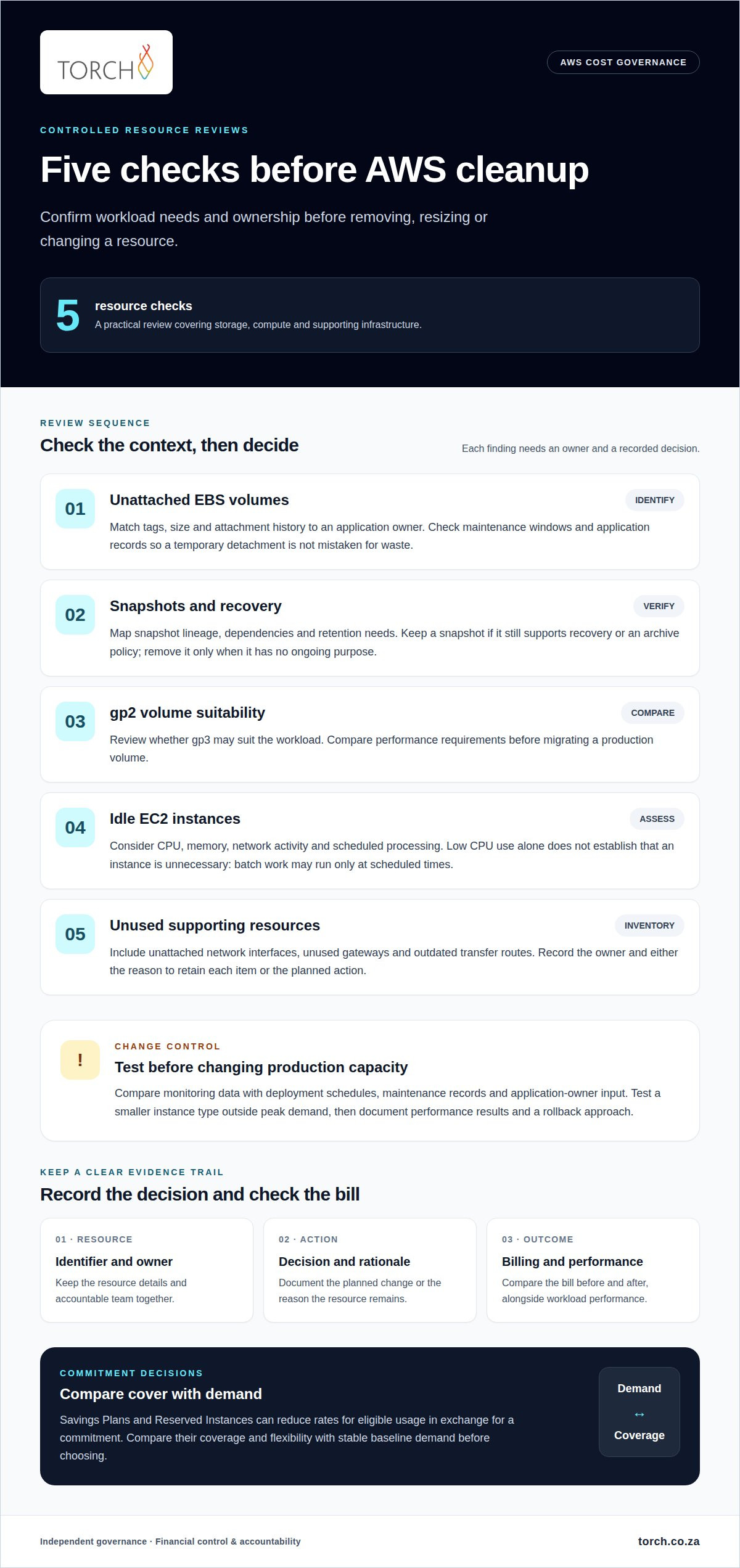
Start with an inventory of unattached Amazon EBS volumes and snapshots. Before planning cleanup, confirm whether each resource still supports an active workload. Review attachment history over a consistent lookback period and compare it with maintenance windows and application records. This helps avoid treating a temporary detachment as waste. Record each resource identifier, its owner and the decision made.
AWS charges depend on the services used, the amount of usage and the selected regions. For South African reporting, use the billing currency and tax details in your AWS billing documents, and apply VAT treatment through your organization’s accounting process. Savings Plans and Reserved Instances can reduce rates for eligible usage in exchange for a commitment. Compare their coverage and flexibility with stable baseline demand before choosing either.
- Identify each unattached EBS volume. Match its tags, size and history to an application owner before taking action.
- Check snapshots against recovery needs. Confirm dependencies and retention requirements before deleting older copies.
- Review gp2 volumes for gp3 suitability. Compare performance requirements before migrating a production workload.
- Investigate idle EC2 instances. Consider CPU, memory, network activity and scheduled processing before rightsizing or removing an instance.
- Inspect unused resources. Include network interfaces, gateways and obsolete transfer paths in the inventory.
Low CPU use alone doesn’t prove an EC2 instance is unnecessary. A batch workload may remain idle between scheduled runs, while memory pressure can reveal sizing constraints. Compare monitoring data with deployment schedules, maintenance records and application-owner input. Test a smaller instance type outside peak demand before changing production capacity. Record performance results and a rollback approach alongside the change.
Review snapshots with the same care. A snapshot may be the last recovery point for a deleted volume or support an archive policy. Map snapshot lineage and ownership first, and remove a copy only when it has no ongoing recovery or retention purpose. In shared accounts, document the decision and accountable team alongside the resource identifiers.
Include resources beyond storage in the review. Check idle compute, unattached network interfaces, unused gateways and outdated transfer routes. Assign each item an owner and record either its retention reason or the planned removal action. This makes cleanup a controlled architecture decision, not a deletion based on a single metric.
Track the AWS bill before and after each change, alongside workload performance. Record the resource, action, expected effect and observed billing change, then revisit exceptions in the next review. This creates an evidence trail for savings and helps distinguish lasting optimization from costs shifted elsewhere.
What Is an AWS Cost Optimization Checklist?
An AWS cost optimization checklist turns billing information into repeatable reviews, decisions and assigned actions. It connects resource use with workload needs, ownership and performance, helping teams avoid infrastructure changes that create operational problems. For example, a storage review should consider access patterns and recovery requirements, not just the amount of data stored. The checklist makes these criteria visible and easier to apply consistently.
Storage choices should reflect how information is used. S3 Standard suits frequently accessed objects, whilst less frequently accessed data may fit another storage class. Lifecycle policies can transition eligible objects or expire data when its retention purpose has ended. Review application dependencies and retrieval needs before changing policies, since a lower-cost tier may affect access charges or retrieval behaviour.
Spot Instances suit fault-tolerant workloads that can withstand interruptions, such as flexible batch processing. On-Demand instances provide capacity without a long-term commitment, while Savings Plans apply to eligible usage under a commitment. Compare workload flexibility, availability requirements and demand predictability before choosing a purchasing option.
AWS cost visibility tools include Cost Explorer, AWS Budgets, Cost Anomaly Detection, Trusted Advisor and AWS Pricing Calculator. Use them to examine spending patterns, set alerts, investigate unexpected changes and model planned workloads before deployment.
- Review S3 access patterns. Match storage classes to retrieval frequency and application response needs.
- Set lifecycle rules deliberately. Define transitions and expiry actions around retention and recovery requirements.
- Clean incomplete multipart uploads. Configure S3 lifecycle rules to remove abandoned uploads.
- Set CloudWatch Logs retention. Align stored log history with operational investigation and reporting needs.
- Review Amazon RDS configuration. Compare database capacity and storage with workload demand and growth patterns.
Amazon EBS, snapshots, S3 and CloudWatch Logs each need distinct retention decisions. For an RDS database, review backup retention alongside recovery objectives, then ensure stored backups support the required restoration process. Keep the reason for each retention choice with its resource owner. That helps prevent routine cleanup from removing data needed for recovery or investigation.
Include data transfer in the checklist. Map which services exchange data, where processing occurs and whether repeated movement serves a business purpose. For example, placing an application closer to its frequently accessed data may reduce unnecessary transfers. Assess the effects on resilience, access and performance before changing the architecture.
For a structured discussion about IT cost governance, book a governance review.
Budgets, anomaly detection and tagging governance
Begin budget governance by defining what each budget represents. An account-wide limit can show overall exposure, while a service or workload view can help locate the source of spending. In AWS, separate production and development costs where the account structure allows. Document the budget owner, included services and response process so each notification prompts a decision, not just another message.
Use AWS Budgets alerts to flag actual or forecast spending that approaches an agreed limit. Pair them with AWS Cost Anomaly Detection to surface unusual changes that may not breach a budget immediately. An increase in data processing, for example, may reflect planned demand or an unexpected deployment. Route the alert to someone who can compare billing details with release records and explain the variance.
- Define budget scope. State whether it covers an account, service, environment or workload.
- Assign alert ownership. Name the person or team responsible for investigating each notification.
- Document alert outcomes. Record the cause, decision and any follow-up action against the affected resource.
- Standardise cost allocation tags. Agree on keys and values for applications, environments, teams and cost centres.
- Review forecast assumptions. Update expected demand when deployments, migrations or workload plans change.
Tags provide context for cost allocation, but inconsistent values can fragment reporting. For example, “prod,” “production” and “live” may describe the same environment while appearing as separate categories. Establish approved tag values and apply them through deployment processes. Use AWS cost allocation reporting to identify gaps, then assign corrections to resource owners. Define how to allocate shared services instead of leaving them unattributed.
Forecasts are most useful when their assumptions remain visible. Record expected workload changes, planned launches and known seasonal patterns alongside each forecast. When actual billing diverges, compare the variance with those assumptions before treating it as waste. This helps distinguish legitimate demand growth from an unexpected configuration or usage change.
Connect showback to operational ownership. Give each team a view of its attributed AWS usage and explain shared-cost allocations clearly. Teams responsible for applications can then relate consumption to deployment decisions, rather than receiving an unexplained charge. Keep business context with exceptions, especially when a workload needs additional capacity for resilience or performance.
Close each review by assigning an owner and recording the next action. This could mean correcting a tag, revising a forecast assumption or investigating a service-level anomaly. A clear record links billing evidence to operational decisions and makes budget governance useful to finance and engineering teams.
Automated cost governance and optimization metrics
Automation makes cost controls repeatable, but every rule needs an owner and an exception path. Start with a defined control, such as flagging resources that lack required cost-allocation tags. Route the alert to the accountable team, record its response and retain an approval trail for changes. This gives finance and engineering teams visibility into both spending and follow-up.
Build a focused set of measures that connects AWS usage with operational outcomes. Cost Explorer can provide spending data for service, account and region reviews. Pair that view with workload and capacity measures so a lower bill does not conceal reduced performance or increased operational risk. Review trends against an agreed baseline, then explain material changes through a recorded action or exception.
- Track commitment coverage and utilisation quarterly. Compare Savings Plans and Reserved Instances with sustained usage, and identify commitments that no longer match demand.
- Measure resource utilisation alongside spend. Include compute, database and storage measures, so rightsizing decisions reflect workload behaviour.
- Track unit costs where allocation data supports them. For example, compare cost per transaction or customer across the same service and period.
- Monitor forecast variance. Record whether actual AWS billing differs from the forecast, then assign an owner to explain the movement.
- Measure exception closure. Track whether alerts result in an approved change, a documented business reason or further investigation.
Use automation to detect issues before enabling automatic remediation. A policy can identify unattached volumes, unexpected regional deployments or retention settings outside approved standards. Route findings for human approval when changes could interrupt a service. Keep the rule, affected resource, decision and outcome together so the control remains auditable and operationally safe.
Service control policies can strengthen governance by limiting actions across accounts. Apply them in development first for 1-2 weeks, monitor denied actions, then expand gradually to production. This staged approach surfaces workflow conflicts before wider enforcement. Document exceptions with an owner and expiry review, rather than creating permanent exclusions that weaken the control.
Use a balanced scorecard, not savings alone. Include cost variance, commitment utilization, tagging coverage, unresolved anomalies and workload performance. Review the AWS Well-Architected cost optimization pillar twice a year, then assign actions to named owners. This cycle links evidence to decisions and tests whether optimization improves commercial outcomes without reducing required capacity.
Torch Services
Torch is independent, carrier-agnostic, no vendor commissions, so its IT FinOps-as-a-Service supports invoice reconciliation and variance analysis against contracts and purchase orders, alongside budgeting and forecasting support. This is useful when cloud billing needs clearer ownership, consistent reporting or integration with wider IT spending controls. Torch also connects cost governance with security exposure: unattended or idle resources represent an unmonitored attack surface, so its governance approach helps organisations identify, assign and review these resources rather than treating cloud optimisation as generic AWS cost cutting.
The service also covers accruals, journals and recharges, vendor and procurement engagement, and monthly IT finance packs in Excel and PowerBI. That broader view can help connect AWS usage with the financial processes and accountability surrounding other IT costs, rather than treating cloud as an isolated bill.
Contact Torch Services to discuss your IT cost governance needs.
Turn cloud visibility into accountable decisions
Use the AWS cost optimization checklist 2026 as a governance baseline, not a one-off clean-up. The next step is to turn recurring findings into decisions: which workloads merit investment, which controls should be automated, and who owns exceptions. That keeps optimisation connected to service performance and business priorities, rather than treating a lower bill as the sole measure of progress.
Where cloud costs sit within wider IT spend, Torch Services can help connect cost visibility with governance. Its services include IT FinOps-as-a-Service, Telecom Expense Management, Automated User support and asset management. This wider view can be useful when cloud billing, ownership and financial reporting need more consistent oversight across IT. A focused discussion can clarify priorities and responsibilities without assuming every organisation has the same requirements.
Start with clear ownership and practical measures, then refine them as workloads change. A disciplined review cycle helps your team make informed decisions and keep cloud resources aligned with business needs.
Frequently Asked Questions
How do you right-size cloud resources without breaking things?
Right-size gradually, using representative workload tests and a rollback plan. First, identify dependencies such as scheduled jobs, peak-period processing and service integrations. Test a proposed configuration in a non-production environment, then compare response times, error rates and throughput with the existing setup. For production changes, use a staged rollout and define rollback conditions beforehand. Review results with the service owner before applying the change to similar workloads.
Priority matrix: where should you start?
Prioritize work by weighing financial impact, confidence in the diagnosis, implementation effort and operational risk. Start with actions that appear material, have clear ownership and can be reversed safely. For example, correcting an unexplained resource allocation may carry less risk than changing a database architecture. Put high-impact, high-risk changes in a separate queue for analysis, testing and approval. This helps teams focus without treating every alert as equally urgent.
Which architecture changes reduce cloud costs long-term?
Architecture changes can lower ongoing costs when they align capacity with actual demand. Consider whether elastic scaling, asynchronous processing or separating independent workloads could avoid keeping full capacity available for occasional peaks. Review data placement too: applications that repeatedly move large datasets across regions may benefit from processing data closer to where it is stored. Assess each design against reliability, security and performance requirements, then compare its operating model with the current architecture.
What are AWS cost optimization best practices for 2026?
Make optimisation a governed operating practice, not an isolated technical exercise. Give each workload a business owner, document why exceptions remain, and assess proposed changes against service performance and security controls. Use unit measures, such as cost per transaction, when they reflect actual business activity. Review whether changes improve that measure over time, rather than judging success by a lower invoice alone. The AWS cost optimization checklist 2026 should support decisions, ownership and follow-through.
How can S3 storage classes, lifecycle policies, and data transfer choices reduce AWS costs?
Match S3 storage classes to how often data is accessed and how quickly teams need to retrieve it. Lifecycle policies can transition eligible objects or remove data that has passed its retention purpose. Before changing a policy, check application access patterns and recovery needs. For transfer, map which services exchange data and where they run. Reducing unnecessary copies and repeated cross-region movement can improve cost visibility whilst preserving the required data flows.
What are the 2026 AWS Savings Plans and Reserved Instance discounts and commitment rules?
Savings Plans and Reserved Instances can offer 20-72% off on-demand pricing. Savings Plans can lock in baseline usage for one to three years; compare coverage and flexibility with stable demand, and aim for at least 95% utilization.