
A cloud bill can be accurate and still leave decision-makers without a clear view of who is spending, why costs are changing or which resources are underused. Azure cost management tools for enterprise environments bring together spend visibility, allocation, budget alerts and resource-efficiency insights, helping teams turn usage data into accountable decisions.
Azure Cost Management provides a foundation for tracking expenditure and examining trends. Broader FinOps tools can add governance across teams, subscriptions and business units. The challenge is choosing capabilities that fit your operating model without adding complexity or obscuring the links between cost, ownership and security. This guide explains how enterprise tools support cost visibility, accountability and resource efficiency, and what to consider when deciding how to manage and report Azure spend.
Key Takeaways
- Map cloud costs to departments, projects and owners so spending has clear accountability.
- Combine budgets, alerts and anomaly detection to identify unusual spend and guide timely action.
- Assess how well a tool supports hybrid environments, reporting needs and links between cost and security.
- Use FinOps practices to connect usage data with forecasting, allocation and informed platform decisions.
- See how managed IT cost governance can support invoice analysis, budgeting and clearer reporting.
Dedicated cloud cost management and FinOps platforms
Enterprise teams can use Azure Cost Management, Azure reporting through REST APIs and Power BI, or dedicated FinOps platforms such as Apptio Cloudability. The right choice depends on whether teams need subscription visibility, departmental allocation or governance across hybrid and multi-cloud environments. Azure cost management tools for enterprise teams should support the level of cost ownership and reporting their operating model requires.
Dedicated FinOps platform options
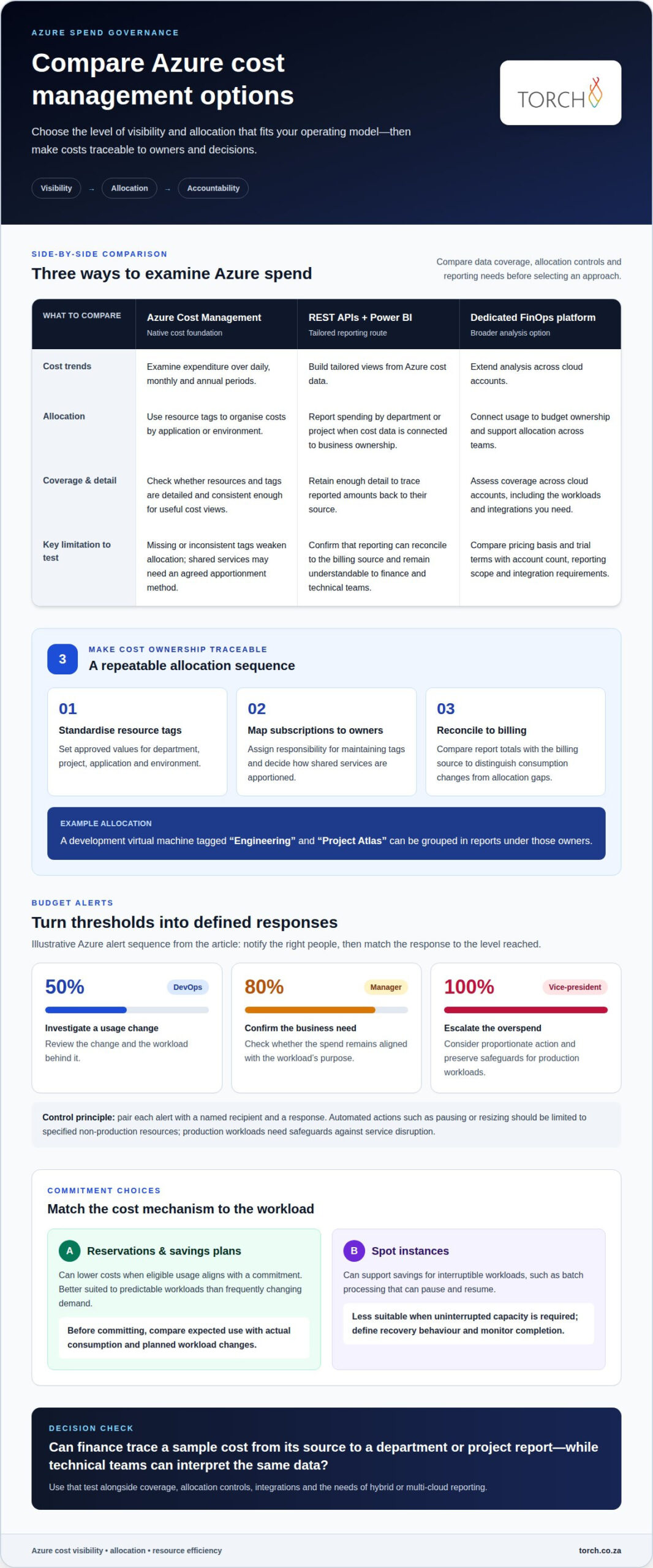
Azure Cost Management shows cost trends over daily, monthly and annual periods, while resource tags can organise views by application or environment. REST APIs and Microsoft Power BI support tailored reporting; dedicated FinOps platforms can extend analysis across cloud accounts and connect usage to budget ownership. Compare data coverage, allocation controls and whether virtual machines, compute services and Kubernetes workloads are shown at a useful level of detail.
Mapping costs to departments and projects
Start with a consistent tagging model for department, project, application and environment. For example, a development virtual machine tagged “Engineering” and “Project Atlas” can be grouped in reports under those owners. Azure Cost Management can organise resource costs by applied tags, but missing or inconsistent tags weaken allocation. Define approved tag values, assign responsibility for maintaining them and decide how to apportion shared services.
Azure cost management gets harder when resources span subscriptions, teams and billing arrangements. A finance report may show total cloud costs without revealing which project generated them. Use a repeatable process: standardise resource tags, map subscriptions to business owners, then reconcile report totals with the billing source. This helps distinguish changes in consumption from allocation gaps, such as a shared virtual environment charged to a central team.
Hybrid and multi-cloud management adds another layer: Azure data must be interpreted alongside costs from other environments. Establish a common allocation structure for business unit, application and owner, then retain each provider’s original billing detail as the source record. Where technology budgets also include connectivity, linking Azure reporting with telecom expense management can help present related IT expenditure in a more coherent view.
When evaluating Apptio Cloudability, include its pricing basis and trial terms rather than assuming they suit every enterprise. Compare the proposed scope with the number of cloud accounts, reporting needs, allocation requirements and integrations involved. When selecting Azure cost management tools for enterprise environments, test whether finance can trace a sample cost from its source to a department or project report, while technical teams can interpret the same data.
Automated cost optimisation and resource efficiency tools
Available options include native Azure Cost Management features and automation for managing usage. Reservations and savings plans can reduce cloud costs when eligible consumption aligns with a commitment, while resource controls can help address waste and unexpected changes.
Automated cleanup and anomaly detection
Azure automation can identify resources that remain active without a clear operational need. For example, teams can schedule development virtual machines to stop at 7 PM on Friday and restart at 7 AM on Monday. Anomaly detection adds a separate control: it flags unusual usage patterns for investigation. Review the resource owner and workload before enabling automated deletion or shutdown.
Budgets, alerts and automated triggers
Spending budgets can help teams monitor costs across defined areas. Alerts can notify relevant owners as actual or forecast costs approach those limits. A useful setup pairs each alert with a named recipient and a response, such as reviewing a new compute workload. This turns a budget into an active control rather than a figure reviewed only after billing.
Threshold alerts and automated actions
A practical Azure alert example notifies DevOps at 50% of budget, a manager at 80%, and a vice-president at 100%. Each threshold can prompt a proportionate action: investigate a usage change, confirm the business need, or escalate an overspend. Automation can then pause or resize a specified non-production resource, but production workloads need safeguards against service disruption.
Reservations and savings plans
Azure reservations and savings plans can lower costs when an organisation commits to eligible usage and can sustain that consumption. They are better suited to predictable workloads than services whose demand changes frequently. Before committing, compare expected usage with actual consumption patterns and account for planned migrations or workload changes. Consider operational flexibility alongside the potential unit-cost benefit.
Spot instances can support savings for interruptible workloads, such as batch processing that can pause and resume. They are less suitable for workloads that require uninterrupted capacity. Automation can help manage interruptions, but teams should define recovery behaviour and monitor whether workloads complete reliably.
For a practical discussion about budget alerts, automated actions and commitment choices, request a complimentary audit of a sample of your invoices.
Enterprise FinOps visibility and accountability
FinOps connects Azure infrastructure usage with business ownership and decisions. A clear operating model gives finance, technology and application teams shared responsibility for spending.
Finance-led FinOps platforms
A finance-led platform turns cloud billing data into information leaders can use for forecasting, allocation and chargeback. For example, finance can send raw Azure cost data to Power BI or an ERP system, then report spending by department or project. Preserve enough detail to trace reported amounts back to their source.
Set a regular review involving finance, procurement and technical owners. Finance can investigate variances, while application teams explain changes in compute or infrastructure use. Review a reserved commitment alongside actual workload consumption, for example. This shared process helps distinguish an allocation issue from a genuine change in demand.
FinOps on Azure
On Azure, establish a repeatable path from consumption data to a management decision. First, assign ownership for each subscription and workload. Next, bring cost information into a finance-facing report. Then ask the responsible team to explain material changes and agree on follow-up actions. This creates a defined route from cloud usage to accountability.
For example, an Azure application may support several business services while its infrastructure appears under one technical subscription. A finance report can show the application’s total spending, but business owners still need an agreed allocation method. Documenting that method helps explain how shared costs are assigned to departments and supports consistent reporting across periods.
Azure Advisor can be part of a review alongside cost information, but recommendations need operational context. A technical change may affect availability, performance or security exposure, so the workload owner should assess the impact before acting. Linking infrastructure decisions to named owners and business purposes helps teams weigh commercial optimisation against service needs and managed risk exposure.
Finally, define a decision record for each material change: the Azure workload, accountable owner, reason, approval and outcome. This creates a practical audit trail for internal review without mistaking a dashboard for the decision itself. Finance gains a clearer view of spending, while technology teams retain the context needed to explain why an Azure resource remains in use.
Enterprise Azure spend management features and tradeoffs
Enterprise spend control depends on whether cost information supports clear decisions, not simply on how much detail a report contains. Assess how billing scope, workload ownership and approval processes fit together before deciding which features matter most.
Azure Cost Management provides cost analysis capabilities, but there is no single South African enterprise price that applies to every organisation. Separate Azure consumption from any third-party platform licence, and model applicable commercial terms in rand using your organisation’s Azure agreement and required scope.
Cost information can be used in Power BI or accessed through REST APIs; finance-led workflows may also send it to an ERP system for chargeback. The trade-off is between a quick management view and the extra design needed to make reports useful for internal decisions. Decide which roles need to see costs and what action each report should support.
Billing visibility also requires a clear review process. For example, if an application owner disputes a monthly allocation, finance needs an agreed way to investigate the charge and record the resolution. Define who handles exceptions, how adjustments are approved and how the final explanation is retained. This strengthens governance without relying on a dashboard as the sole record.
Consider a workload’s business purpose alongside its cost. A compute increase tied to an approved product launch has different implications from an unexplained increase in a dormant test environment. Finance and technical owners should interpret the same variance together, weighing service needs, security exposure and commercial value before changing resources.
For South African budgeting, compare tooling in rand and keep Azure consumption distinct from software or service fees. Evaluate reporting requirements, user access, integration effort and internal ownership as separate decision factors. This clarifies the commercial comparison without treating a feature list as a complete estimate of enterprise expenditure.
Choose an option that gives decision-makers enough visibility while keeping responsibilities and review steps clear. A focused assessment can establish which capabilities support your governance model and where additional reporting is warranted.
Azure Cost Management can integrate with REST APIs and Microsoft Power BI for further cost-management customisation. Treat integration as a design choice: establish which cost views need customisation and who will use them, then assess whether each view supports an existing review or approval decision. Keep its purpose explicit so customisation does not become an end in itself.
Also assess whether an Azure cost management tool links cost data with security posture through a security graph model. Include this alongside reporting and ownership requirements when evaluating fit. The answer can help decision-makers judge whether the tool considers cost visibility and security posture together, rather than assessing cost reporting in isolation. This connection is a differentiator because it brings cost governance and security governance into a shared decision-making view. By showing those relationships together, the security graph model makes that differentiator actionable for governance teams.
Torch Services
Torch Services helps enterprises connect cloud expenditure with wider IT cost governance. Its proposition is ‘One Partner, Six Integrated Service Lines’: TEM, TLM, UEM, FinOps, ITAM and SecOps. Torch is independent, carrier-agnostic and vendor-neutral, with no commissions. It has operated in the South African market for over 20 years and reports R667.5M+ saved since 2004 across 12 African countries.
Turn to Torch when Azure cost data needs to fit into broader IT finance processes. Torch’s IT FinOps-as-a-Service covers invoice reconciliation and variance analysis against contracts and purchase orders, accruals, journals and recharges, budgeting and forecasting support, vendor and procurement engagement, and monthly IT finance packs in Excel and PowerBI. This helps finance and technology teams bring cost information into regular management decisions.
Asset accountability also matters when cloud services depend on devices and other technology assets. Torch’s asset-management service maintains a full asset register, with every asset attributed to a cost centre and lifecycle tracking from procurement to decommission. ISO/IEC 19770 and ITIL 4 provide useful references when shaping asset and service management practices, without replacing an organisation’s own governance decisions.
ITAM, UEM and FinOps bring asset, ownership and cost-centre information into a shared view. TorchLight™ supports cost allocation, modelling and scenario planning; PowerBI board packs built on TorchLight data give CFOs and CIOs structured information for reviewing IT expenditure. This helps connect Azure-related decisions to ownership and wider technology priorities, rather than treating a cloud dashboard as the entire governance process.
For organisations seeking support beyond Azure’s native cost views, Torch can help strengthen allocation, reporting and accountability across IT expenditure. Start by defining the reporting gap, the teams involved and the decisions the information needs to support. This keeps the work focused on practical governance and commercial optimisation.
Contact Torch Services to discuss your IT cost governance needs.
Make the next decision deliberate
Before extending Azure cost management tools for enterprise use, define the decision the reporting must support. For example, decide whether the next review should clarify ownership, explain a forecast variance or guide a workload change. A focused objective gives finance and technology teams a practical way to assess whether their cost information is useful.
Then agree who will interpret the information, who can approve action and how the outcome will be recorded. This connects analysis to operational accountability without treating a dashboard or automated recommendation as a decision in itself. Keep the process proportionate: use the level of detail needed for the decision and refine it as priorities change.
A measured approach helps your organisation strengthen spend governance while retaining the flexibility to adapt its Azure environment. Discuss your priorities and next steps with Torch.
Frequently Asked Questions
How can enterprises allocate Azure costs across departments, subscriptions, and teams?
Use subscription ownership and consistent resource tags to assign costs to business units, projects and teams. For example, a department tag can group its application resources, while a project tag separates development spending from shared infrastructure. Establish an allocation rule for resources serving several teams, record who approves it and apply the same approach in reports. This gives finance a traceable basis for chargeback or internal budget reviews.
Which third-party cloud cost management platforms support Azure, and how do they compare?
Apptio Cloudability is one dedicated platform option for Azure cost management. Azure Cost Management is the native choice for analysing Azure usage, while Cloudability may suit organisations assessing dedicated FinOps capabilities across their cloud estate. Compare each against your reporting, allocation and governance requirements, using a sample workload to test how costs are grouped and presented. Consider the data detail and integrations finance needs before choosing an approach.
What reports and cost data can Azure Cost Management export to Power BI or other tools?
Azure Cost Management can show daily, monthly and annual cost trends, with resources grouped by applied tags. REST APIs and Power BI support tailored reporting, and raw Azure cost data can be sent to Power BI or an ERP system for chargeback.
How does Azure Cost Management compare with Azure budgets, Cost Analysis, and exports?
Azure Cost Management provides cost trends, tag-based grouping, and reporting through REST APIs and Power BI. Its budgets set spending limits for a subscription or defined scope and can alert owners when actual or forecast costs approach those limits.