
A self-service IT support portal lets employees access support information and complete routine online tasks at any time, even when a service desk agent isn’t available. Key self-service IT support portal benefits include searchable guidance for common issues such as password resets, software installation, Wi-Fi troubleshooting and printer setup. A portal can also provide a way to request help when self-service isn’t enough. Access to portal resources around the clock does not mean live assistance is available around the clock.
Useful guidance can make routine support easier to manage, but a portal works best when information is easy to find, accurate and regularly updated. This article explains what a self-service IT support portal is, how search and knowledge bases help employees find answers, and which tasks they can handle online. It also shows how self-service complements the service desk, so organisations can improve access without trying to automate every issue.
Key Takeaways
- Understand how a self-service portal gives employees a central place to find information and manage routine support needs.
- See how relevant search and well-maintained knowledge articles can help users find guidance more easily.
- Distinguish round-the-clock access to support materials from live assistance, which depends on service desk availability.
- Identify routine tasks that users may be able to complete online, and recognise when an issue needs support staff.
- Learn where Torch Services’ Automated User support fits when organisations want to make routine IT assistance easier to access.
What is a customer self-service portal?
A customer self-service portal is a branded website where users find information, complete tasks and seek solutions without direct agent assistance. In IT support, it can serve as level 0, helping employees address routine needs before contacting the service desk.
Personalised self-service experiences
Personalisation can present guidance and tasks relevant to a user’s needs, role or access. For example, an employee setting up a printer could see printer instructions, while someone locked out of an account could find password-reset guidance. Authentication can help tailor access. Clear categories and familiar language make relevant help easier to find and routine issues easier to resolve.
Implementation costs depend on the portal’s scope, integrations, authentication, content development and ongoing maintenance. Assess these requirements together: a portal offering account actions or links to other systems involves different work from one focused on publishing guidance.
Employee and customer experience
Employee and customer experience depends in part on how easily people can find information or complete tasks through an organisation’s support channels. For employees, clear software guidance can reduce frustration during routine work. For customers, useful account information and straightforward help can support a more consistent service experience. In both cases, relevant answers and a visible route to human assistance can encourage people to keep using the support channel.
For South African organisations, accessibility, data protection and compliance requirements depend on the users, information and systems involved. Make access practical with readable text, clear navigation and keyboard-friendly controls. Protect personal information through appropriate permissions and encryption, and align portal processes with applicable organisational obligations.
A portal can help employees handle routine requests without waiting for an agent. For example, an employee may resolve a Wi-Fi connection issue by following a troubleshooting guide, leaving service desk staff more time for cases that need direct investigation.
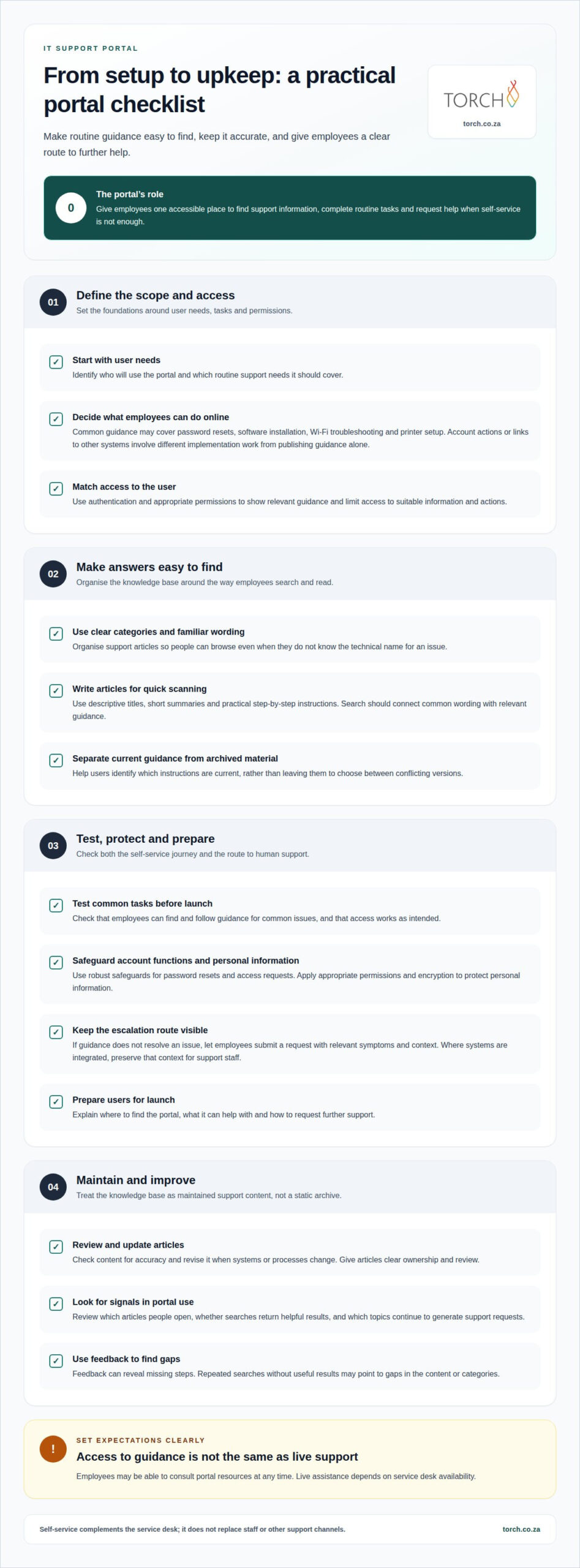
Security and privacy risks include unauthorised access to account functions, exposure of personal information and outdated guidance that directs users towards unsafe actions. Password resets and access requests need robust safeguards, and permissions should limit users to information and actions appropriate to them.
Implementation typically starts with defining user needs, organising accurate articles, configuring search and access, testing common tasks, and preparing users for launch. Ongoing maintenance includes reviewing content for accuracy, monitoring searches and feedback, and updating articles when systems or processes change. These steps help keep the portal useful over time.
Portal features such as smart search and a centralised knowledge base
A useful portal brings search, support articles and service requests together in one accessible place. Its value depends on whether employees can find relevant guidance and move smoothly to further help when they need it.
Search and knowledge resources
Smart search helps users find relevant guidance by matching their words to articles, categories and troubleshooting resources. A central knowledge base gives employees one organised place to look instead of scattered documents or old email instructions. For example, someone searching “cannot connect to Wi-Fi” should find a practical diagnostic guide, not unrelated network policies.
Well-structured categories help users who don’t know the technical name for a problem. Search should recognise common wording and direct users to useful results when their first query is too broad. Clear titles, short summaries and step-by-step instructions make articles easier to scan and follow. Results should distinguish current guidance from archived material, so users aren’t left choosing between conflicting instructions.
With a portal, users can consult articles or submit requests without starting with an agent. A chatbot may suggest relevant articles or create a ticket, while service desk staff handle issues that need investigation or personal support. The portal provides a shared entry point, not a replacement for staff or other support channels.
Knowledge articles and communities
Knowledge articles document approved answers, while a customer community lets users exchange questions and practical experience. Both can help people find solutions, but articles need clear ownership and review. For example, an outdated guide to software access could direct users through steps that no longer match the organisation’s process.
Useful measures include which articles users open, whether searches return helpful results, and which topics still generate support requests. Feedback can reveal missing steps, while repeated searches without useful results may point to gaps in categories or content. These signals help teams prioritise updates and prevent the knowledge base from becoming an archive.
Integrating a portal with existing IT service management tools can connect knowledge searches, request forms and service desk workflows. For example, a user who can’t resolve an issue can submit a ticket with its category and relevant details, helping support staff understand the request without asking the user to repeat everything. Integrations should preserve context as a request moves between systems, so staff can see what the user has already tried.
Keep the escalation route visible alongside guidance. If an article doesn’t resolve an issue, a clear request option lets employees provide relevant symptoms and context. A chatbot can recommend an article first, then create a ticket if further assistance is needed.
Review search terms and feedback alongside ticket themes. If employees repeatedly search for the same issue, improve article titles, add missing instructions or adjust categories. This ongoing review keeps portal guidance aligned with actual support needs.
24/7 Availability of support materials
A self-service portal can make support materials available 24/7, including outside service desk hours. Employees working late, travelling or starting early can consult guidance without waiting for an agent. That means access to answers is continuous; it does not mean that live support or every technical task is available around the clock.
The distinction matters during a real incident. An employee preparing a presentation after hours might use a guide to reconnect a meeting-room display, while a fault requiring administrator access may need the support team. Clear instructions should explain what users can try and how to escalate if the issue remains unresolved.
Round-the-clock access is most useful for recurring issues with clear, safe instructions. A guide to syncing a work calendar on a mobile device, for example, can explain the relevant settings and what to do if syncing still fails. An outage affecting several teams, by contrast, may require investigation and coordinated action rather than a knowledge article alone.
Reliable answers depend on content that reflects current systems and procedures. An article describing an old VPN sign-in screen can confuse users even if it remains accessible at midnight. Assign an owner to each topic, record when it was last reviewed, and update instructions after system changes to keep support materials dependable.
Organisations can use portal activity to identify where self-service helps and where it falls short. If searches for “printer offline” lead users to an article but support requests continue, the guidance may need clearer steps or an escalation option. Patterns in unanswered searches can also reveal topics that need new content.
Availability also depends on how employees reach the portal. They should be able to find support materials from a familiar device, with clear navigation and readable instructions. If access relies on a system affected by the same incident, such as a company sign-in service, users may need an alternative support route.
To assess operational value, compare recurring request themes before and after relevant articles are introduced. A reduction in avoidable tickets can indicate that guidance helps deflect suitable requests, but it doesn’t prove every case is resolved. Assess article usefulness alongside ticket trends and user feedback.
For South African teams with varied working schedules, a 24/7 portal can extend access to approved guidance beyond office hours. Its contribution to savings depends on whether employees can resolve the issue themselves, the quality of the instructions and the availability of staff for cases needing human intervention.
Online self-service features
Online self-service lets employees complete selected IT tasks through digital forms and automated workflows. One practical self-service IT support portal benefit is a clear way to submit requests instead of relying on informal email chains. The portal can capture the information needed to assess and route each request.
For example, an employee organising a project could request access to a shared network resource and state the business purpose and required team. A structured form can route the request for approval and show its progress. This gives users a consistent way to raise requests and helps teams manage them through an established process.
Automation is most useful for tasks with clear inputs, approvals and outcomes. A network-service request, for instance, can gather the requested configuration and route it to the responsible team. APIs can connect network-service management with other systems and automation scripts.
Online case handling can also help direct users to the right channel. A form could distinguish a request for shared-resource access from a reported service interruption, then direct each to the relevant process.
Make available actions easy to understand. A portal might offer forms to request access to a shared workspace, report a lost device or ask for a network-service change. Each form should explain which details are needed and what users can expect after submission.
Build security into each action. Access controls can restrict sensitive requests to authorised users, while approval steps help prevent unreviewed changes. For example, adding a colleague to a restricted workspace should follow an appropriate authorisation path, unlike a general enquiry about a service.
Usage information can help teams refine workflows. If users often abandon a form requesting network access, its wording or required fields may need attention. Reviewing completion patterns alongside follow-up tickets helps distinguish a confusing process from a request that genuinely needs further support.
Further self-service IT support portal benefits come from automating suitable work, not simply moving every request online. Clear task boundaries, useful forms and appropriate approvals help employees complete routine actions while keeping sensitive decisions visible to the teams responsible for them.
Torch Services: Automated User support
Torch Services’ Automated User support can help bring structure to routine IT requests. A portal can provide self-help information, while a defined process can help manage requests that require more than an article.
Consider this offering when employees regularly need help with common IT tasks and existing support channels make those requests difficult to manage consistently. The right approach depends on the tasks involved and how they fit into the organisation’s support processes.
To explore whether this approach suits your needs, request a complimentary review of your self-service support experience.
Make support access an operational priority
Treat self-service as an operating capability, not just a portal launch. Set clear ownership for content and workflows, then review whether the support experience reflects how employees work. This gives technology leaders a practical basis for deciding what to improve next.
Self-service IT support portal benefits are easier to assess alongside the wider support model. Torch Services offers Automated User support, Telecom Expense Management and an asset-management service rather than a software platform, addressing distinct needs across user assistance and technology governance. These offerings suit organisations looking beyond a standalone information resource towards coordinated management of IT support and assets.
Start by identifying which recurring user-support needs deserve attention and how they connect to your organisation’s existing processes. A focused discussion can clarify where automated support fits and which operational requirements should shape the approach.
A thoughtful next step can make support access a more deliberate part of how your organisation operates. Torch Services is independent, carrier-agnostic, vendor-neutral, no commissions.
Frequently Asked Questions
How do you choose the right self-service platform?
Choose a platform by matching its capabilities to your organisation’s support workflows and user groups. Map common request types, approval paths and the systems that need to exchange information. For example, a portal for employees and contractors may need different access permissions and guidance for each group. Also consider who will maintain content, monitor usage and manage escalations, so the portal remains aligned with operational responsibilities.
What is a self-service IT support portal?
A self-service IT support portal is an online entry point where employees can find IT guidance and access support tasks independently. It is more than a collection of frequently asked questions: users may also submit requests or follow an established process. For example, a new employee could find onboarding instructions and request access to an approved application through the relevant workflow.
What are the main benefits of an IT self-service portal for employees and IT teams?
An IT self-service portal gives employees a consistent route to information and routine support, while helping IT teams manage demand more clearly. A request form can capture details such as the affected system and business impact before a technician reviews the case. Teams can use recurring request themes to identify confusing processes or areas where further guidance could improve the support experience.
How does an IT self-service portal reduce help desk tickets and support costs?
A portal can reduce tickets when users complete suitable tasks themselves or find guidance before contacting support. Structured request forms can also reduce follow-up exchanges by collecting useful details at submission. To assess the financial effect, compare ticket volumes and handling costs with implementation and ongoing portal costs. Treat incidents and complex service requests separately, as their handling effort can differ.
What features should an IT self-service portal include?
Useful features include searchable guidance, clear service categories, request forms, status updates, access permissions and a visible route to support staff. Feedback tools and usage reporting help teams identify weak articles or confusing workflows. For example, an application-access form can capture the requested application and business reason, then show the employee whether the request is awaiting review or has been actioned.