
Unused SaaS access is easiest to uncover by matching login evidence with the licences the business pays for. To discover unused SaaS licences, compare SSO logs with an application inventory and licence records, then review accounts with little or no activity before renewal or removal.
A paid seat can seem necessary simply because it is still assigned to an employee. But role changes, duplicate tools and dormant accounts can make that assumption inaccurate. SSO logs show when people last accessed an application, but they are most useful alongside application activity, assigned seats and subscription costs.
This guide explains how to bring those records together, identify accounts that need closer review, and reclaim or adjust access without disrupting work. You’ll learn how to build a complete app inventory, assess licence utilisation and track usage to strengthen SaaS cost governance in a South African organisation.
Key Takeaways
- Set a practical inactivity threshold, then compare sign-in evidence with licence costs before deciding whether to reclaim a seat.
- Build an application inventory from identity, finance, procurement and usage records to reveal subscriptions missing from departmental lists.
- Manual audits can lose accuracy as ownership, access and renewal details change; consistent tracking helps keep records current.
- Use licence tracking to identify dormant accounts, duplicate subscriptions and renewal decisions that need attention.
- Torch’s ITAM service links assets to owners and cost centres, while IT FinOps-as-a-Service supports invoice reconciliation, variance analysis and IT finance reporting.
How do department-led SaaS purchases create unused licenses?
Department-led buying can create overlapping subscriptions, unclear ownership and seats left assigned after roles change. In South Africa, POPIA applies when activity logs contain information that identifies employees. Responsible parties must process personal information lawfully for a specific purpose and safeguard it. Limit log access to authorised roles and explain why monitoring takes place. There is no universal savings figure: reclaimed value depends on licence terms, seat prices and renewal arrangements.
- Set a consistent activity review method before examining accounts. Compare login records with application sessions and feature use, rather than treating one quiet period as proof that a seat is unnecessary. A specialist may use software infrequently but still need access for a key workflow or occasional responsibility.
- Match identity information with finance and procurement records. Compare SSO exports with expense entries, purchase records and contract details to identify shadow purchases or subscriptions recorded under different names. Before acting on a mismatch, confirm that each record refers to the same application and account.
- Review software compliance reports for assigned seats, active users and feature engagement. Consider last login dates, session frequency and licence utilisation trends together. These reports can flag potentially idle or underused access, but the application owner must provide context to establish whether an employee still needs it.
- Compare use of paid features with the subscription tier. An employee may log in but rely only on functions available in a lower tier. Review the contract’s options and the work the subscription supports before proposing a downgrade, cancellation or seat reclaim.
- Compare software installation records with application access and account reports. An installation alone doesn’t prove ongoing use, and its absence doesn’t establish that a licence is redundant. Before removing access, ask the employee or manager whether it supports backup duties, seasonal work or a required task.
Useful reports include SSO activity exports, application session histories, feature-use summaries and assigned-seat records. Review them alongside billing and contract information: no single report proves that access can safely be removed. Confirm the purpose with the relevant manager, document the decision and retain access if a business need remains.
Building a complete SaaS application inventory
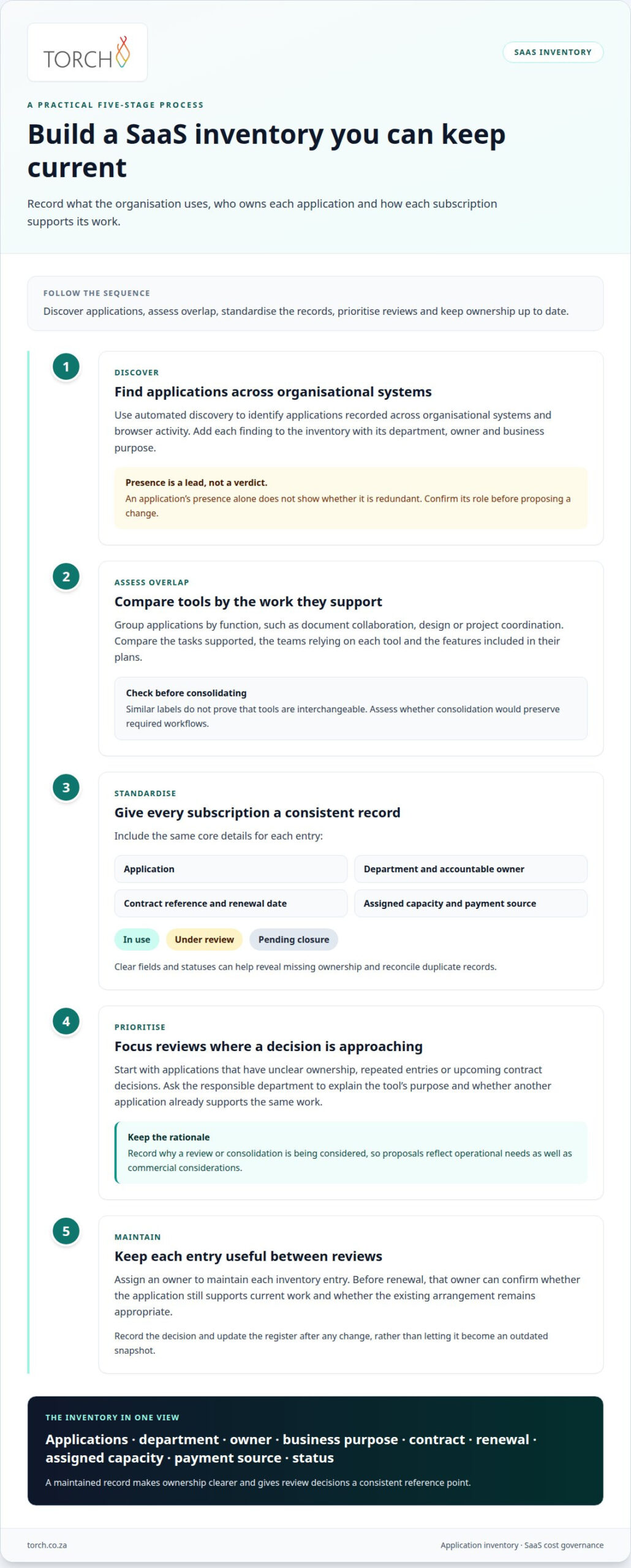
Create an inventory showing which applications the organisation uses, who owns them and how each subscription supports its operations. A reliable register enables informed optimisation instead of decisions based on incomplete departmental lists.
-
Discover applications automatically
Use automated discovery to identify applications recorded across organisational systems and browser activity. Add each finding to the inventory with its department, owner and business purpose. Discovery can surface subscriptions adopted independently by teams, but an application’s presence alone doesn’t show whether it is redundant. Confirm its role before proposing changes, and distinguish approved business software from entries that need investigation.
-
Consolidate overlapping applications
Group tools by function, such as document collaboration, design or project coordination. Compare the tasks each application supports, the teams that rely on it and the features in their plans. Similar labels don’t prove two tools are interchangeable. Identify genuine overlap, then assess whether consolidation would preserve required workflows and avoid moving employees to a less suitable option.
- Maintain a consistent record for every subscription. Include the application, department, accountable owner, contract reference, renewal date, assigned capacity and payment source. Give each entry a clear status, such as in use, under review or pending closure. Consistent fields help reveal missing ownership and reconcile duplicate records without mistaking multiple entries for separate subscriptions.
- Prioritise reviews according to business relevance and renewal timing. Start with applications that have unclear ownership, repeated entries or upcoming contract decisions. Ask the responsible department to explain the tool’s purpose and whether another application already supports the same work. Record the rationale so consolidation proposals reflect operational needs as well as commercial considerations.
- Assign an owner to maintain each inventory entry. Before renewal, that owner can confirm whether the application still supports current work and whether the existing arrangement remains appropriate. Record the decision and update the register after any change. This keeps the inventory useful between reviews instead of letting it become an outdated snapshot.
For a structured discussion about inventory priorities, book a governance review.
Challenges with manual licence audits
Audit SaaS licences by reconciling subscription records with assigned access, reviewing usage and contract terms, then confirming business need before reclaiming seats. Manual reviews can become unreliable when exports and spreadsheets are updated at different times.
- Define the audit scope and record the review date. Bring together the application list, subscription records and access exports for the period under review. Note the source and extraction date beside each file. For example, a finance export from one month may not match an access report captured after employee role changes.
- Standardise metrics before comparing applications. Use consistent fields for assigned seats, active users, subscription cost, renewal date and utilisation period. Distinguish active access from purchased capacity. If one team counts shared accounts and another excludes them, their totals won’t support a reliable spending decision.
- Investigate discrepancies instead of treating them as proof of waste. A difference between an invoice and an access list could reflect a timing gap, a separate contract or overlapping subscriptions. Ask the application owner to explain the variance and document the evidence. This helps prevent an incorrect record from prompting an unnecessary cancellation.
- Set a repeatable audit frequency. Conduct a comprehensive SaaS licence review quarterly, with monthly checks for high-cost subscriptions. Quarterly reviews provide regular opportunities to identify changed workflows, dormant access and contract changes. Monthly attention to costly applications helps surface material variances before the next renewal decision.
- Close each review with a recorded decision for every flagged seat. Confirm the employee’s current responsibilities and any backup or seasonal role before removing access. Then record whether the team retained, downgraded or reclaimed the licence, and update the subscription record. This creates an audit trail for the next review.
Before uninstalling software, confirm with users whether they need it to perform their tasks effectively. A common starting point for a software inventory is the 20 vendors with the highest spend.
SaaS management platforms and license tracking
A tracking system is useful when it supports clear ownership and consistent follow-through. Before implementation, assess how a platform fits your organisation’s existing records and decision processes.
-
Track licences with SaaS management platforms
Use a SaaS management platform to organise application, subscription and ownership records in one view. Assess which data sources it can connect to, how it presents activity and whether teams can assign responsibility for follow-up. Align access permissions with job responsibilities, and ensure the relevant application owner can review flagged records. Alerts should prompt investigation, not automatic licence removal.
- Define a clear response for each alert. For example, an application owner could classify a flagged account as active, awaiting review or ready for a formal access decision. Record who made the decision and when, so teams can resolve exceptions without restarting the investigation. A documented workflow also helps procurement and IT follow the same approval path.
- Test report consistency before relying on platform outputs. Check whether exports use the same account identifiers and reporting periods as internal records. For instance, a shared account may appear differently in a user report and a subscription file. Resolve these differences before interpreting totals or proposing a change to budget holders.
-
Compare available audit tools and costs
Compare SaaS management platforms with identity-system reports and the finance or procurement records available to South African organisations. Each provides a different view: identity reports capture authentication, while finance records show payments and commitments. Tool costs vary by licensing model, integrations, support and contract terms. Compare equivalent requirements and request prices in Rands before choosing an option.
- Choose a tool based on the governance gap it needs to address. If teams struggle to assign responsibility, prioritise ownership workflows and decision records. If reporting is fragmented, assess data connections and export formats. Document the tool’s scope, access permissions and process owner, then review whether it helps teams act consistently on findings.
Torch Services
Torch Services can help when SaaS subscription records, access information and IT spending are spread across teams. Its IT cost governance work connects asset and financial information, giving decision-makers a clearer basis for reviewing ownership, utilisation and renewal decisions. This is a practical next step when manual checks leave gaps between what the organisation pays for and who is responsible.
Torch is independent and operates on a no-commission model, so its recommendations are not influenced by commissions from software or technology vendors.
Torch’s asset-management service provides an asset register, with assets attributed to cost centres and tracked through their lifecycle. This view helps establish what the organisation owns, who is accountable for each item and where its cost is allocated. For SaaS governance, that context supports reviewing subscriptions alongside the wider IT estate, rather than treating each invoice as an isolated expense.
Torch’s asset management, Unified Endpoint Security & Management and IT FinOps-as-a-Service connect operational responsibility with cost records in one governance picture. If a subscription or related asset has unclear ownership, teams can identify the gap and determine which manager should validate its ongoing business need. The aim is clearer decisions, not automatic removal of access.
Torch’s IT FinOps-as-a-Service addresses the financial records behind those decisions. It covers invoice reconciliation and variance analysis against contracts and purchase orders, as well as accruals, journals and recharges. It also supports budgeting and forecasting, vendor and procurement engagement, and monthly IT finance packs in Excel and PowerBI. These activities help identify discrepancies between recorded commitments and billed expenditure, while giving finance and technology teams a consistent view for review.
Consider this support when subscription ownership is fragmented, invoices are difficult to reconcile or renewal decisions lack dependable cost context. Torch’s work centres on IT cost governance and commercial optimisation, connecting financial records with asset ownership and operational information. It helps teams bring greater discipline to reviews without assuming that low activity alone proves a licence is unnecessary. Managers still need to consider role requirements and business impact before changing access.
For a discussion about strengthening IT cost governance, contact Torch Services.
Make SaaS governance part of everyday decisions
Knowing how to discover unused SaaS licences is a starting point. Sustained control comes from assigning clear ownership and including licence reviews in procurement and renewal decisions. This allows changes in application use to inform future commitments, instead of surfacing only when an invoice arrives.
Torch Services supports technology cost governance through Telecom Expense Management, automated user support and an asset-management service. These services address related needs across IT expenditure, user support and asset oversight, giving organisations a practical way to strengthen accountability as their technology environment changes.
If your teams need a clearer view of SaaS-related spending and governance, contact Torch Services to discuss the next steps.
With clear ownership and consistent reviews, your organisation can make better-informed decisions about the technology it funds.
Frequently Asked Questions
How can SSO logs help in managing SaaS costs?
SSO logs show which users authenticate to applications through the organisation’s identity system. They help distinguish accounts with recent sign-ins from accounts that may need investigation. However, an SSO record won’t capture every application or prove that a user needs a particular licence tier. For example, someone may sign in occasionally but never use premium features. Compare login evidence with business responsibilities before changing access.
What is unused enterprise software?
Unused enterprise software is a paid application or licence that no longer supports an active business need. It might be a seat assigned to a former employee, a duplicate application retained after a team change, or a subscription no department actively owns. Underutilised software is different: employees may still use it, but not enough to justify the current plan or number of seats.
How can I identify idle SaaS licences?
Look for accounts that appear inactive across multiple records, then investigate why. For example, compare an employee’s status in the staff directory with the application’s account list and recent activity. Check service accounts and integrations separately, since automated processes may operate without a person logging in. Ask the relevant manager to confirm the account’s purpose before reclaiming its seat.
How can a SaaS management platform aid in licence optimisation?
A SaaS management platform can bring subscription records, application accounts and ownership details into a shared workflow. For example, when an employee changes teams, an owner can review their access and record whether each licence remains necessary. Clear decision records help prevent repeated investigations and show why a seat was retained, downgraded or reclaimed. Platform findings still need appropriate business review.
How can regular auditing enhance SaaS management?
Regular audits help organisations catch changes that a one-off review misses, such as a team adopting a new application or an employee leaving while access remains active. They also create a consistent record of decisions for finance, IT and application owners. For example, comparing a subscription’s current allocation with its previous review can reveal unexplained growth and prompt a contract or ownership discussion.
What is the importance of quarterly governance for licences?
Quarterly governance gives licence owners a recurring opportunity to review access, ownership and upcoming renewal decisions. It can surface changes between annual budget cycles, such as a department no longer needing a tool after a workflow changes. A documented review also assigns responsibility for follow-up, so flagged subscriptions don’t remain unresolved because finance, procurement and IT hold different parts of the record.