
A laptop can be tagged and still be difficult to account for if its record does not show who holds it or where it is. Effective tracking IT assets for remote employees links each device’s unique identifier to its assigned user, location and condition, then updates that record as the laptop moves, is repaired or returned.
Managing equipment across home offices and regions requires clear ownership and consistent records. The right tracking method depends on how your organisation identifies devices, verifies assignments and maintains visibility throughout the asset lifecycle.
This guide explains how to build a reliable process, verify laptop records and choose suitable technologies, from QR codes and barcodes to RFID and connected monitoring devices. It also shows how asset tagging and shared records can support accountability, compliance and decisions about equipment reuse. The aim is practical: clarify what remote asset management needs to deliver without adding unnecessary complexity for employees or IT teams.
Key Takeaways
- Keep a central asset register that links each laptop to its user, location, condition and lifecycle status.
- Use virtual or on-site verification to identify record discrepancies and update asset statuses.
- Choose tracking technology to suit your needs: QR codes and barcodes support identification, while RFID and connected devices can add monitoring capabilities.
- Build clear return, secure data-erasure and disposition processes to support asset recovery and reduce misplaced equipment.
- Torch’s asset-management service provides a full asset register, with each asset tied to an owner and cost centre from procurement to decommission.
How professional asset management can overcome remote-work challenges
A managed service can connect equipment records with follow-up throughout the device lifecycle. The right scope depends on your distributed workforce, return volumes and refresh patterns.
-
Assessing tracking and inventory needs with a managed service
Distinguish asset tracking from inventory management before defining the service. Inventory records what equipment exists; tracking follows its assigned user, location, condition and movement. For example, a laptop listed in inventory still needs an updated assignment when it moves from an employee to storage. A stock count alone does not verify current ownership.
- Map each device’s lifecycle, from procurement and allocation through repair, return and redeployment. A managed service can follow up on missing asset data, overdue returns and status changes, then record the outcome. When a laptop is returned, for example, capture its condition and next status before allocating it again. This creates a clearer basis for audits and planning.
Shelf-as-a-Service is an operating model for assessing where equipment needs to be held ready for deployment. Define which device types and user requirements it covers, and how stock movements update asset records. This helps distinguish available equipment from devices already assigned to remote staff.
-
Choosing an asset management service
Set the required follow-up before selecting tools or a provider. Check how the service records assignments, repairs, transfers and returns, and how it reports exceptions. ISO/IEC 19770 and ITIL 4 offer useful references for framing asset-management processes. Avoid a service that counts equipment without showing who owns each follow-up action.
- Assess outsourcing against workload, not headcount alone. Remote asset management may merit consideration for organisations with 50-100 distributed employees, depending on refresh frequency and turnover. It may also become worthwhile above 100 remote employees or with at least 20 device returns per year. These signals help frame a business case; return logistics and repeated record corrections also shape the workload.
Look for a defined process covering equipment distribution, employee follow-up, returns and redeployment. For example, the process should show how a laptop’s record changes after a repair or an employee’s departure. That continuity matters when remote work spreads devices across locations and internal teams have limited capacity to coordinate each lifecycle event. Where remote device tracking forms part of a broader technology strategy, specialist providers such as solaas.it can deliver tailored, scalable IT solutions that keep distributed teams fully supported.
How a provider audits compliance and verifies physical assets
A structured audit compares asset records with equipment held by remote employees. Virtual checks, on-site visits and documented status updates can help surface discrepancies.
-
Checking audit compliance and physical assets through a managed service
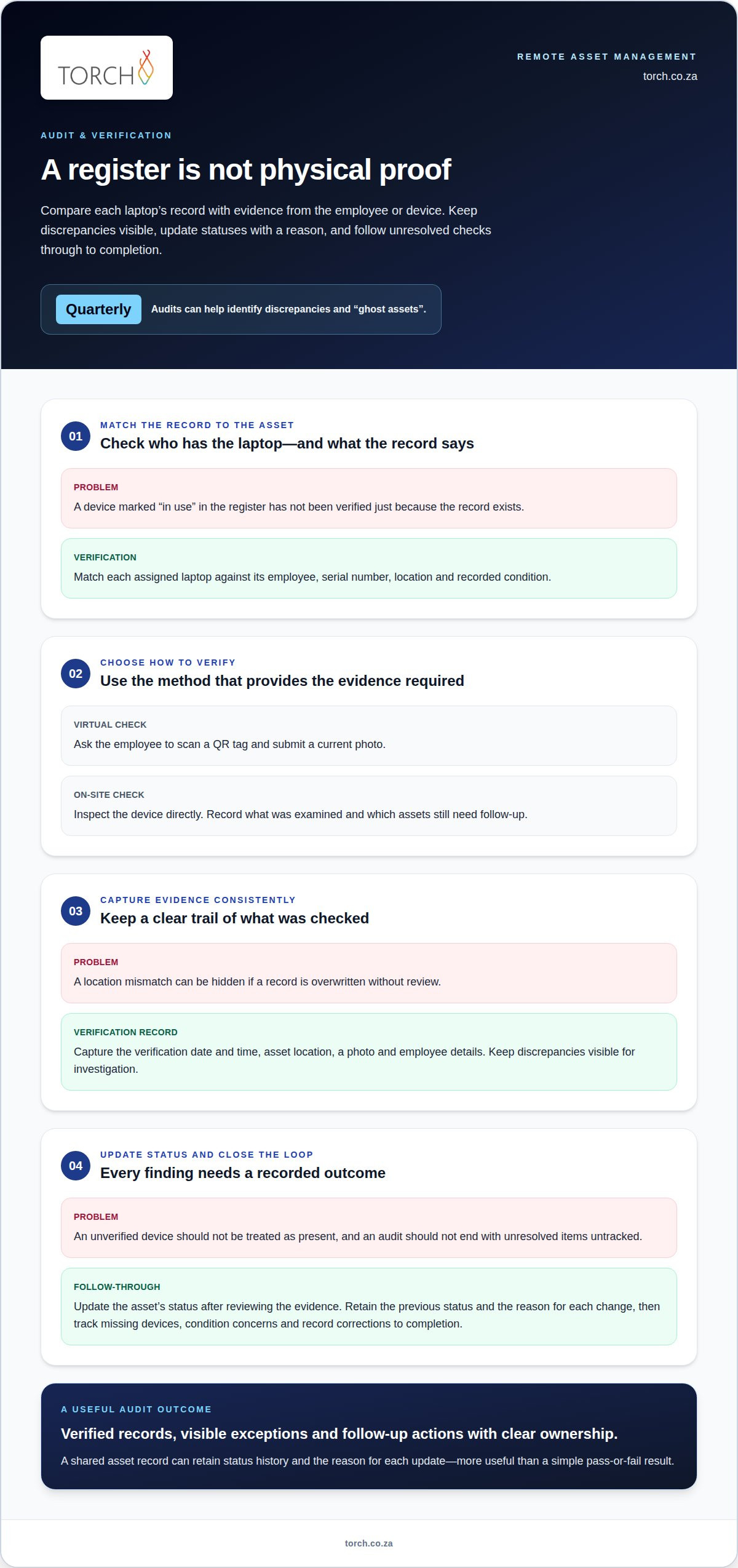
Set the audit scope, then match each assigned laptop against its asset record. A provider can confirm the employee, serial number, location and recorded condition. For example, a laptop listed as “in use” should be checked with its assigned employee, not counted as verified from the register alone. Quarterly audits can help identify discrepancies and assets recorded but physically missing, often called “ghost assets”.
Choose virtual or on-site verification according to the evidence required. A virtual check might ask an employee to scan a QR tag and submit a current photo; an on-site visit can inspect the device directly. In either case, the audit record should show what was examined and which assets still need follow-up.
- Agree on the evidence to capture for each verification before the audit begins. A mobile record might include the verification date and time, asset location, a photo and employee details. If a laptop’s recorded location differs from the employee’s submission, for example, keep the discrepancy visible for investigation rather than silently overwriting it.
-
How a provider updates asset status after audits
Require the provider to update each asset’s status after reviewing the audit evidence. A verified laptop can remain marked as assigned; a device awaiting repair should be recorded accordingly. If a remote employee cannot verify a device, the record should flag the unresolved check and assign a follow-up action, rather than imply that the equipment is present.
Use a shared asset management system to retain the previous status and the reason for each change. If an inspection identifies a damaged screen, for example, record the condition and repair status together. This makes the software record more useful than a simple pass-or-fail result and supports later reviews.
- Close each audit by reconciling verified records with unresolved items. Report missing devices, condition concerns and records needing correction, then track each action to completion. If an asset listed in storage is confirmed with an employee, for example, correct its location and review its assignment. This gives managers clearer visibility without treating an updated spreadsheet or platform as physical proof.
How can a provider track laptops issued to remote employees?
A central asset record paired with defined follow-up can keep each laptop’s status clear. Effective tracking should show authorised teams each device’s user, location, status and condition without collecting unnecessary personal information.
-
Setting tracking scope and safeguards with a provider
Define which equipment to record, then document its user and business purpose. Include laptops, monitors and peripherals issued for remote work. Employers should communicate handling and return expectations, record assignments and arrange retrieval when employment ends.
When tracking IT assets for remote employees, set clear privacy safeguards. Explain what device information is collected and why, and restrict access to people who need it. Distinguish information about company equipment from unnecessary monitoring of an employee’s activity.
Reduce security exposure by limiting access to asset records and collecting only relevant details. For example, record a device’s assigned location rather than continuously monitoring an employee’s movements. Connect asset oversight with unified endpoint management so device governance and security processes work together.
-
How a provider centralises device tracking records
Keep a central record for each device, linking its asset identifier with the user, location, status and condition. When a laptop goes for repair, update its status and location together. Avoid separate lists that can leave teams working from conflicting records.
For tracking IT assets for remote employees, document handovers so records reflect each change. When a laptop is returned, for example, record receipt and its condition before marking it available. This distinguishes equipment awaiting inspection from devices ready for redeployment.
-
How a managed service can reduce device loss and misplacement
Set follow-up for unverified assignments, overdue returns and devices marked for repair. A provider can contact the recorded user, coordinate retrieval and update the record after the laptop arrives. This gives each unresolved device a clear next action rather than leaving it as an unexplained discrepancy.
Include secure data erasure and disposition in the device lifecycle. Before redeployment or remarketing, arrange data destruction and assess the laptop’s condition. A usable device may be considered for redeployment, while equipment unsuitable for reuse can be directed to secure disposal. Timely retrieval also helps preserve options for value recovery.
Asset tracking technologies
Choose technology according to what distributed teams need to identify and verify. A QR label may suit laptop handovers, while connected monitors can provide information about equipment condition. The system matters as much as the tag: asset records need to reflect each device’s lifecycle and authorised use.
- Use QR code or barcode labels when employees need to identify an asset during a handover or audit. Each label should carry a unique ID linked to a digital record. Scanning a laptop’s QR code, for example, can bring up its record for a status check. The scan identifies the asset, but staff still need to record changes in user or location.
- Consider RFID tags when the process involves scanning groups of tagged equipment. An RFID scan can help reconcile laptops held in storage with their digital records. A managed stock check, for example, can reveal an item that needs investigation. Define how staff record scan results and handle equipment that is not detected, rather than treating the scan alone as proof of ownership.
- Use GPS or IoT devices only where location or condition monitoring serves a clear business purpose. GPS can help monitor asset location, while IoT devices can monitor condition and performance. A connected device may, for example, provide condition information about equipment in a distributed environment. Limit information collection to the asset-management purpose and control who can access those records.
- Connect tags to a centralised asset management system that holds lifecycle records. It should show each device’s ID, assigned user, location and current status. When a laptop goes for repair, for example, update its status without losing its previous assignment history. This makes the system useful for tracking IT assets for remote employees, rather than simply storing tag numbers.
- Match each technology to the verification task before combining methods. QR scans can support employee handovers; RFID may suit stock checks; GPS or IoT may add location or condition monitoring. Cloud-based solutions, such as those supported by managed service providers like ManagePoint, can make asset data and applications accessible to authorised teams. A centralised record, for example, can help distributed teams review lifecycle changes consistently. The practical value of technology for tracking IT assets for remote employees is choosing tools that support reliable records and clear decisions.
QR code labels, barcode labels and RFID tags are common options. An asset tag can contain a unique asset ID linked to a digital asset database. GPS, RFID or IoT devices can monitor locations in remote work environments.
Torch’s asset-management service for remote employees
Torch Services provides an asset-management service for organisations seeking clearer oversight of equipment assigned across remote teams. It forms part of One Partner, Six Integrated Service Lines: TEM, TLM, UEM, FinOps, ITAM and SecOps.
The ITAM service provides a full asset register, with every asset attributed to a cost centre and tracked from procurement to decommission. This gives teams a structured view as equipment is acquired, assigned, moved, repaired or retired. For example, a remote laptop’s record links the asset to its owner and cost centre, clarifying responsibility and allocation.
ITAM, UEM and FinOps share one view, with every asset tied to an owner and a cost centre. Together, these services connect equipment oversight with endpoint governance and IT spend management. When a laptop’s assignment changes, for example, teams can review the update alongside the device’s lifecycle record rather than relying on disconnected lists.
Torch is independent, carrier-agnostic and vendor-neutral, with no commissions. This supports an independent governance approach to asset oversight, focused on the organisation’s records and requirements. The service is relevant when dispersed equipment makes ownership, status or lifecycle oversight difficult to maintain.
A consistent register provides a basis for reviewing assigned equipment, assets in transition and devices reaching decommission. It also supports accountability when equipment moves between employees or cost centres. The goal is to keep the asset lifecycle visible, rather than treating an equipment list as a substitute for lifecycle management.
For a low-friction next step, request a complimentary audit of a sample of your invoices via Torch Services.
Frequently Asked Questions
Employee Asset Mapping: Who Has Which Laptop?
Use an asset register that connects each laptop’s unique identifier to its current user. If an employee changes teams, for example, record the reassignment and effective handover instead of relying on an old onboarding form. Assign responsibility for resolving unmatched records, such as a laptop still assigned to a former employee. This clarifies allocation decisions and helps prevent duplicate records from obscuring accountability.
What happens when a remote employee’s device breaks?
Record the fault against the device and arrange an assessment before deciding whether to repair, replace or retire it. Mark a laptop as unavailable while it is being assessed, for example, so it is not allocated to another employee prematurely. Keep the user, service team and asset record aligned as the device moves through repair. Once resolved, update its condition and availability before redeployment.
What is Asset Tagging for IT Devices?
Asset tagging places a unique identifier on equipment and links it to a digital record. A QR label on a laptop, for example, can help staff retrieve the correct record during a handover. The tag identifies the asset; it does not provide live location information by itself. Choose a label that remains readable during normal handling, and keep the linked record current as the device’s status changes.
What’s the biggest mistake companies make with remote employee assets?
A common control failure is treating an asset register as a one-off list instead of updating it after each handover or status change. A returned laptop may remain recorded as assigned if nobody closes the transfer. Assign responsibility for completing each update, including departures, repairs and redeployments. This makes exceptions visible and gives managers a route to resolve gaps before they carry into the next review.
How do you choose a provider to track remote employee devices?
Choose a service that can explain how it records handovers, resolves discrepancies and reports devices needing attention. Ask for a sample workflow showing what happens when an employee leaves with equipment still assigned. Check that the service supports your asset register and existing endpoint processes instead of creating an isolated record set. Clear ownership of follow-up matters as much as the technology used to identify devices.
How much does a managed IT asset tracking service cost?
The price depends on the scope of the service and is provided after a quote request. Cost factors include the size and distribution of the device estate, the frequency of audits, and whether the work covers returns, repairs or redeployment. For a South African organisation, define which activities and reporting are required before seeking a quote. That helps align the proposed service with operational needs.