
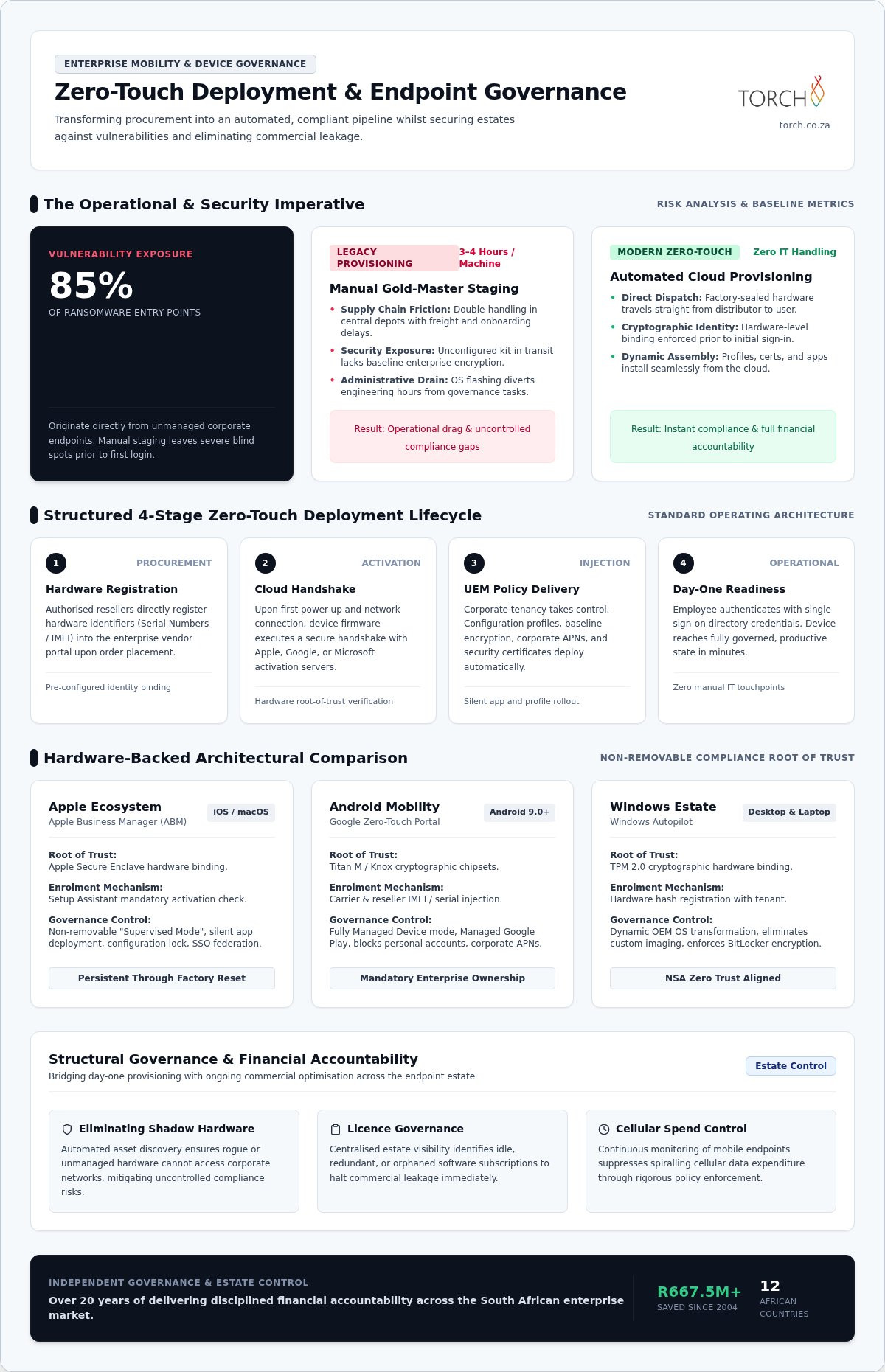
With 85% of ransomware entry points originating from unmanaged corporate endpoints, manually staging and unboxing kit is no longer just an operational bottleneck; it’s an unacceptable enterprise vulnerability. Implementing modern zero-touch deployment for corporate devices directly counters this threat, dispatching factory-sealed hardware straight from the distributor to the employee with baseline encryption and cryptographic identity enforced before first login.
You already recognise the operational drag of traditional rollouts. IT teams waste days configuring operating systems, remote starters face onboarding delays, and unmanaged hardware quietly introduces compliance blind spots. Crucially, disjointed provisioning obscures estate visibility, resulting in commercial leakage through redundant software licences and spiralling cellular data bills. In this guide, you’ll discover how automated zero-touch provisioning eliminates manual IT overhead whilst enforcing endpoint security across your entire estate. We’ll explore how embedding zero-touch mechanics into a broader governance framework turns day-one readiness into enduring financial control and accountability.
Key Takeaways
- Understand how zero-touch deployment for corporate devices replaces manual gold-master imaging with automated, cloud-delivered configurations applied instantly upon unboxing.
- Compare the hardware-backed enrolment architectures of Apple, Android, and Windows ecosystems to ensure non-removable compliance before users access enterprise systems.
- Discover a structured four-stage deployment roadmap to align procurement workflows, distributor IDs, and cloud profiles without operational friction.
- Learn why ongoing endpoint estate governance and asset discovery are essential to prevent shadow hardware and eliminate unmonitored licence and data expenditure.
What Is Zero-Touch Deployment for Corporate Devices?
Traditional corporate provisioning relied on static disk imaging. IT departments maintained bloated “gold master” images, spending three to four engineering hours per machine manually unboxing, flashing the operating system, installing productivity suites, and repacking hardware. In contrast, zero-touch deployment for corporate devices shifts configuration entirely to the cloud. Derived from standard network engineering protocols, Zero-touch provisioning (ZTP) leverages vendor activation servers to assemble policies dynamically the moment an employee powers on a factory-sealed machine.
This automated transition is not merely a logistical convenience; it is a governance necessity. Research confirms that 85% of ransomware entry points originate from unmanaged corporate endpoints. Leaving device configuration to manual checklists exposes the organisation to unencrypted drives, bypassed conditional access, and inconsistent patch states. Modern zero-touch workflows eliminate this administrative burden, transforming procurement into a compliant, automated pipeline.
The Mechanics of Modern Out-of-the-Box Provisioning
The provisioning cycle begins well before hardware reaches the user. When an enterprise procures hardware, the authorised reseller registers unique hardware identifiers directly into the manufacturer’s activation portal. Upon initial startup, the device establishes a secure Internet handshake with vendor activation services, such as Apple Business, Google Zero-Touch, or Windows Autopilot.
The activation server verifies the hardware identity against the enterprise tenancy, seamlessly handing execution over to the organisation’s unified endpoint management platform. Corporate configuration profiles, security certificates, and required applications install automatically in the background. The end-user receives a ready-to-work device within minutes, without internal IT teams touching the physical packaging.
Operational Failures of Manual Corporate Staging
Manual staging creates friction and financial waste across several operational vectors:
- Supply Chain Friction: Routing hardware through a central IT depot introduces double-handling, freight expenses, and onboarding delays for remote staff.
- Security Exposure: Unconfigured hardware in transit lacks enterprise cryptographic controls, creating high-risk blind spots if lost or intercepted before manual enrolment.
- Administrative Costs: Engineering hours spent on operating system installations divert valuable technical talent away from core estate governance and risk mitigation.
Relying on manual handling creates governance gaps that directly undermine corporate control and inflate total operational expenditure.
Architectural Comparison: Apple, Android, and Windows Enrolment
Implementing zero-touch deployment for corporate devices across a heterogeneous estate requires understanding the underlying hardware root of trust. Rather than relying on easily bypassed software agents, each major operating system binds physical components, such as Apple’s Secure Enclave, Android’s Titan M or Knox chipsets, and Windows TPM 2.0, to the corporate tenant. Aligning with the ISO/IEC 27001 information security management standard, this hardware cryptographic identity ensures un-enrolment is impossible, even after a complete factory reset.
Apple Automated Device Enrolment via Apple Business Manager
Apple integrates procurement directly into device activation. Authorised enterprise resellers automatically assign hardware serial numbers to the corporate Apple Business Manager (ABM) portal upon purchase. During the initial Setup Assistant, the device checks in with Apple activation servers, mandating corporate enrolment before reaching the home screen. This enforces non-removable “Supervised Mode”, enabling silent application distribution, strict configuration locks, and Single Sign-On federation via corporate directory credentials.
Android Zero-Touch Enrolment for Enterprise Mobility
Google’s framework delivers carrier-integrated provisioning for Android 9.0+ hardware. Resellers inject International Mobile Equipment Identity (IMEI) or serial numbers directly into the corporate zero-touch portal. On initial boot, the handset connects to Google infrastructure, forcing the device into Fully Managed Device mode. Corporate access point names (APNs), identity certificates, and managed Google Play stores deploy automatically, preventing employees from using consumer accounts on enterprise-owned mobility assets.
Windows Autopilot for Corporate Desktops and Laptops
Windows Autopilot transforms the preinstalled OEM operating system into a secure corporate workstation. Distributors extract and upload the machine’s 4K hardware hash into Microsoft Intune. Modern cloud-native deployments join the device directly to Microsoft Entra ID, avoiding the latency and technical debt of legacy hybrid domain joins. Windows 11 Autopilot also patches critical security updates during the Out-of-Box Experience (OOBE), fortifying endpoints before the employee’s initial sign-in.
Enterprise Implementation: A Step-by-Step Deployment Roadmap
Executing zero-touch deployment for corporate devices requires aligning supply chain operations with IT architecture. Software configuration alone cannot solve procurement missteps. Establishing an automated deployment pipeline demands a structured, multi-stage methodology that bridges upstream suppliers, device enrolment portals, and endpoint security policies. Integrating this pipeline into your wider unified endpoint management framework guarantees operational visibility across the fleet from day one.
Step 1: Procurement Channel Authorisation and Portal Setup
Zero-touch workflows fail when devices are purchased through unapproved retail channels. Enterprise procurement teams must establish authorised corporate accounts with certified OEMs and distributors. Register your organisation’s enterprise IDs, such as Apple Customer Numbers or Google Reseller IDs, directly with suppliers. Enforce strict Role-Based Access Control across your hardware allocation consoles to prevent rogue enrolments and maintain clear audit trails.
Step 2: Configuration Profiles and Security Baselines
Design modular configuration profiles within your management console before unboxing a single machine. Define non-negotiable security baselines: BitLocker or FileVault storage encryption, mandatory PIN complexity, firewall parameters, and corporate certificates. Configure automated Wi-Fi profiles and enterprise APN payload settings so devices connect seamlessly. Application deployments should trigger dynamically based on Microsoft Entra ID or enterprise directory group memberships.
Step 3: Network Readiness and Testing Validation
Device provisioning halts if activation traffic gets blocked at the perimeter. Security engineers must whitelist vendor cloud endpoints, certificate revocation lists, and notification channels across corporate firewalls and deep-packet inspection proxies. Before authorising a widespread rollout, conduct pilot tests across dispersed remote networks:
- Out-of-the-Box Experience Validation: Confirm the device bypasses consumer account creation and connects directly to the enterprise directory.
- Policy Integrity: Audit that zero-touch deployment for corporate devices enforces compliance controls prior to granting production network access.
- Wipe Persistence: Perform a hardware factory reset to verify that management profiles re-engage automatically without user circumvention.
Establishing Structural Governance Across the Endpoint Estate
Automated enrolment solves initial deployment, but standalone configuration tools quickly introduce operational blind spots without persistent estate governance. Once a device reaches the user, unmanaged assets easily drift out of compliance, while associated cellular connections generate quiet, unmonitored expenditure. Actively governed corporate estates achieve up to 47.2% total cost reductions by pairing zero-touch deployment for corporate devices with continuous financial oversight. Integrating baseline deployment controls into comprehensive technology solutions eliminates visibility gaps, allowing continuous subscription and asset adjustment that delivers 19.6% in active management savings.
Unifying Endpoint Provisioning with Telecom Expense Management
Hardware activation directly influences monthly telecom billing. When smart devices and cellular-enabled laptops ship without unified oversight, organisations routinely pay for orphaned SIM cards, duplicate service plans, and unmonitored data roaming. Merging zero-touch workflows with telecoms expense management establishes financial control and accountability from day one. By reconciling carrier inventory with active directory profiles at device boot, enterprise finance teams immediately identify zero-usage lines, prevent runaway data overages, and eliminate wasteful supplier expenditure.
POPIA Compliance and Lifecycle Asset Governance
Zero-touch configuration establishes the baseline required by the Protection of Personal Information Act (POPIA), yet regulatory compliance demands cradle-to-grave governance. Endpoints must be actively tracked across procurement, operational redeployment, and end-of-life disposal.
- Automated Data Protection: Enforce cryptographic remote lock and wipe policies automatically if an endpoint misses compliance check-ins or reports compromised integrity.
- Chain-of-Custody Tracking: Maintain an unbroken hardware audit trail linking device serial numbers, assigned users, physical locations, and carrier subscriptions.
- Regulatory Audit Readiness: Produce verified hardware logs and compliance telemetry to satisfy board-level risk committees and external statutory auditors.
Executing zero-touch deployment for corporate devices should not simply be treated as an IT shortcut. It forms the foundational discipline for comprehensive fleet security, regulatory defensibility, and commercial optimisation across your entire enterprise estate.
Transforming Fleet Provisioning into Enduring Financial Control
Shifting away from manual staging to automated hardware roots of trust eliminates configuration friction and closes critical security exposures. However, technical automation alone cannot secure an expanding corporate estate. Modern zero-touch deployment for corporate devices delivers lasting enterprise value only when paired with continuous asset visibility and disciplined expense management.
With over 20 years of continuous independent advisory experience across African enterprise markets, Torch brings structured oversight to multi-platform device estates. Supported by verified benchmarks including R38.4M in PwC-audited savings and R8.9M SBSA-verified financial optimisation, our consultative framework ensures your procurement channels, cellular expenditure, and security baselines operate under complete commercial accountability.
Take the decisive step towards building an automated, resilient endpoint estate that protects operational capacity while safeguarding your bottom line.
Frequently Asked Questions
Can corporate zero-touch deployment work across personal employee devices under a BYOD policy?
No, zero-touch deployment for corporate devices cannot provision employee-owned hardware. Zero-touch mechanisms rely on verified organisation numbers registered directly by authorised distributors at the point of commercial purchase. Bring-your-own-device (BYOD) programmes require user-initiated enrolment instead. This creates an isolated, encrypted work profile that protects enterprise resources without seizing administrative control over an employee’s personal operating system, photos, or private communications.
What happens if a user connects a zero-touch corporate device to a private Wi-Fi network?
The provisioning cycle proceeds normally over any standard Internet connection. Once the hardware establishes outbound HTTPS connectivity, it automatically contacts the vendor’s cloud activation infrastructure to verify serial tenancy. From there, the machine pulls corporate configurations, enforces internal VPN settings, and applies compliance baselines. The user cannot access the local operating system interface until the device successfully authenticates against the central directory.
How does zero-touch deployment prevent stolen or lost corporate devices from being repurposed?
Hardware-backed enrolment embeds ownership directly into the device’s physical root of trust. If an unauthorised user wipes the machine through recovery mode, the operating system still contacts the vendor activation servers immediately upon reconnection. The platform instantly locks down the hardware, mandates enterprise credentials, and re-engages management controls. This persistence renders stolen machines unusable on the secondary market and completely blocks consumer re-activation.
Is automated zero-touch provisioning supported by all major cellular carriers and hardware distributors?
Most enterprise-grade carriers and authorised commercial distributors support zero-touch integration, but consumer retail channels do not. To implement zero-touch deployment for corporate devices successfully, organisations must procure hardware through certified partners capable of uploading serial numbers into Apple Business, Google Zero-Touch, or Microsoft Partner Center portals. Devices bought from unaccredited high-street retailers require manual enrolment, increasing administrative overhead and introducing governance vulnerabilities.
Can an organisation apply different configuration profiles based on an employee’s corporate department?
Yes, configuration delivery dynamically aligns with user identity and directory architecture. While the initial zero-touch handshake enrols the machine to the corporate tenant, subsequent policy application maps to identity groups within systems like Microsoft Entra ID. Finance personnel automatically receive specific financial models, specialised enterprise software, and restricted sharing policies, whereas field engineers receive distinct connectivity profiles and diagnostics tools without manual IT staging.