
For Chief Information Officers and Chief Financial Officers in mid-to-large African enterprises, the IT helpdesk often represents a paradox. It is both essential for operational continuity and a significant, often unpredictable, cost centre. As ticket volumes rise in response to hybrid work models and increasing device complexity, the traditional response of adding more support staff is no longer financially sustainable. The solution lies not in more people, but in a more intelligent, structured approach: IT helpdesk automation, governed by a robust financial and operational framework.
This is where many organisations falter. They view automation as a purely technical tool—a piece of software to be deployed—rather than a strategic discipline. Effective automation is not about simply deflecting tickets; it is about redesigning support workflows to enhance user satisfaction, strengthen security, and, most importantly, provide clear visibility and control over related IT spend. By adopting IT helpdesk automation best practices, enterprises can transform their support function from a reactive cost centre into a governed, optimised, and value-generating asset.
The Strategic Shift: Why Helpdesk Automation is a Financial Imperative
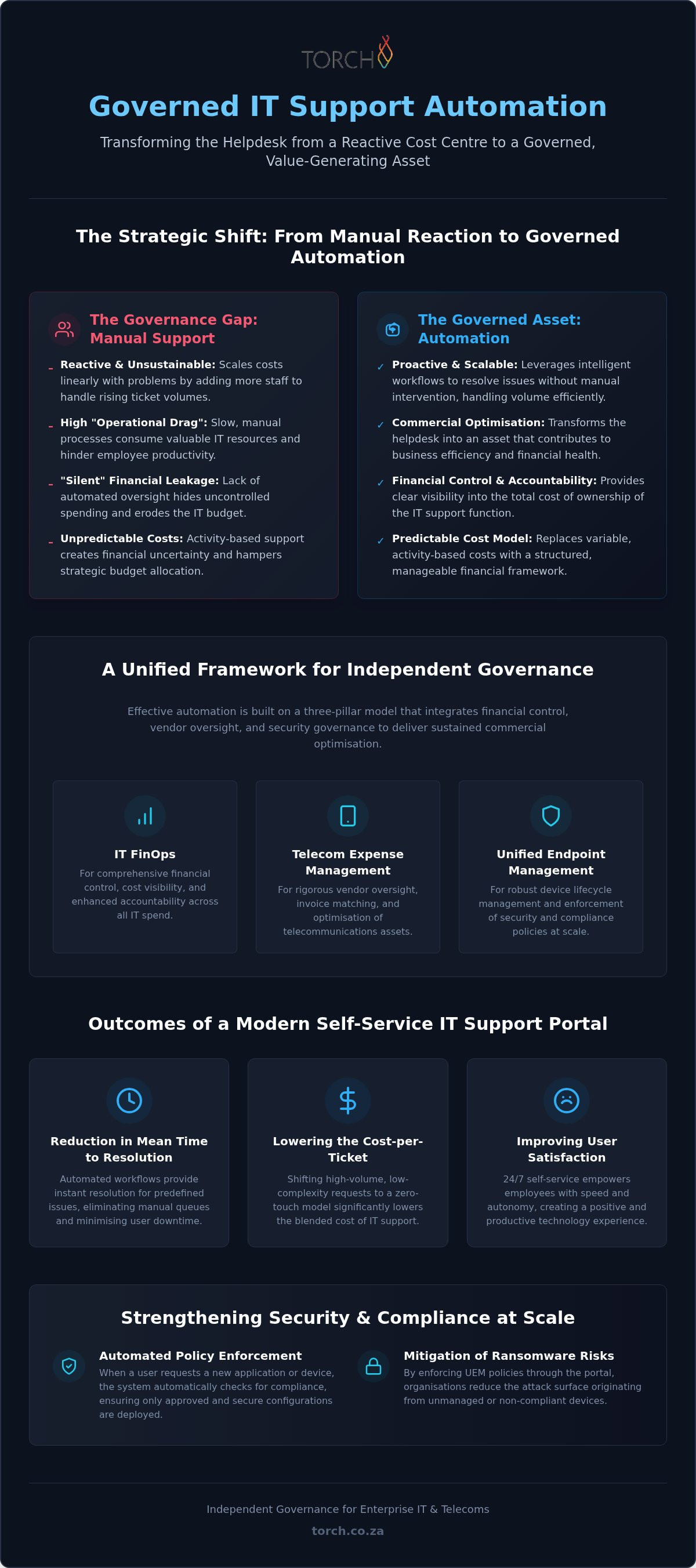
In today’s enterprise environment, IT helpdesk automation is the application of governed, intelligent workflows to resolve recurring user issues without manual intervention. This moves beyond simple ticketing systems to encompass a holistic framework for managing risk, cost, and user experience. For financial leaders, the primary driver for this shift is the need to eliminate “operational drag”—the cumulative cost of slow, manual processes like password resets, device provisioning, and invoice matching that consume valuable IT resources and hinder employee productivity.
From a financial governance perspective, automation is a critical pillar of commercial optimisation. It replaces unpredictable, activity-based costs with a more structured, predictable model. Instead of measuring success by the number of tickets closed, a governed automation strategy focuses on reducing the total cost of ownership for the IT support function, improving financial accountability, and mitigating the risks associated with manual errors and unmanaged processes.
From Cost Centre to Governed Asset
When faced with rising ticket volumes, the default reaction is often to increase headcount. However, this approach is a sub-optimal and unsustainable response. It scales costs linearly with problems, failing to address the underlying inefficiencies. The strategic role of the CFO in modern IT financial management requires a more sophisticated approach—one that leverages technology to create scalable, cost-effective systems.
By automating high-volume, low-complexity tasks, organisations can reallocate skilled IT professionals to high-value strategic initiatives. This transforms the helpdesk from a purely operational expense into a governed asset that contributes directly to business efficiency and financial health. For a deeper analysis of this evolving dynamic, see our guide on The Strategic Role of the CFO in IT Financial Management.
The Governance Gap in Manual Support
Manual support processes often create a significant governance gap, hiding financial waste and operational risk. Without automated oversight, it becomes difficult to track the true cost of support, enforce procurement policies, or ensure vendor accountability. This lack of visibility leads to “silent leakage”—unseen and uncontrolled spending that erodes the IT budget over time.
Independent governance is essential to close this gap. A comprehensive strategy should be built on a three-pillar model that integrates IT FinOps for financial control, Telecom Expense Management (TEM) for vendor oversight, and Unified Endpoint Management (UEM) for device and security governance. This unified framework ensures that automation delivers sustained commercial optimisation, not just temporary efficiency gains.
Defining the Modern Self-Service IT Support Portal
A modern self-service IT support portal is a centralised, user-facing hub that empowers employees to resolve common technical issues independently through automated workflows. For dispersed and hybrid workforces across Africa, these portals are no longer a luxury but a necessity for maintaining productivity and delivering a consistent support experience.
The core principle is to provide 24/7 availability for routine requests, such as resetting a password, requesting a new software licence, or suspending a lost SIM card. This dramatically reduces the volume of low-value manual tasks handled by the IT team, freeing them to concentrate on more complex, strategic challenges. Furthermore, by making technology accessible and intuitive, it provides a consistently supportive experience for every user, every day, reinforcing the organisation’s commitment to employee enablement.
Core Benefits for the Enterprise
Implementing a self-service portal governed by automation best practices delivers measurable commercial and operational benefits:
- Reduction in Mean Time to Resolution (MTTR): Automated workflows provide instant resolution for predefined issues, eliminating the delays associated with manual ticket queues and assignments. Users get the help they need immediately, minimising downtime and frustration.
- Lowering the Cost-per-Ticket: By shifting common requests to a zero-touch model, the enterprise significantly lowers the blended cost per ticket. This allows the IT budget to be reallocated from reactive support to proactive, value-adding projects.
- Improving User Satisfaction: Employees value speed and autonomy. A well-designed self-service portal removes the friction of waiting in phone queues or for email responses, leading to a more positive and productive technology experience.
Security and Compliance Advantages
Beyond efficiency, self-service portals are powerful tools for enforcing security and compliance policies at scale.
- Automated Policy Enforcement: When a user requests a new application or device through the portal, the system can automatically check for compliance with endpoint security policies, ensuring that only approved and secure configurations are deployed.
- Mitigation of Ransomware Risks: A significant percentage of ransomware attacks originate from unmanaged or non-compliant devices. By integrating the portal with a UEM solution, organisations can ensure that every device accessing corporate resources is visible, managed, and secure.
- POPIA Compliance and Audit Trails: Automation creates an immutable audit trail for every user request and system action. This provides documented evidence of compliance with data protection regulations like the Protection of Personal Information Act (POPIA) and simplifies audit preparation.
IT Helpdesk Automation Best Practices for Enterprise Governance
Deploying automation successfully requires a structured, governance-led approach. Simply implementing a tool without a clear strategy will yield limited results. The following best practices provide a roadmap for enterprises seeking to achieve sustained commercial optimisation.
- Identify High-Volume, Low-Complexity Tasks First: Begin by analysing helpdesk data to identify the most frequent and repetitive user requests. Common candidates for initial automation include password resets, SIM card suspensions, software access requests, and basic troubleshooting guides. These quick wins demonstrate immediate value and build momentum for the programme.
- Integrate Helpdesk Data with BI and Financial Models: To prove ROI, automation metrics must be tied to financial outcomes. Integrate helpdesk data with business intelligence (BI) platforms and financial systems to quantify time saved, cost-per-ticket reduction, and the impact on departmental budgets. This provides the CFO with clear visibility into the commercial value of the initiative.
- Ensure Carrier-Agnostic Governance in Procurement: When automation involves procurement (e.g., ordering a new mobile device), the workflow must include independent, carrier-agnostic benchmarking. This ensures that the organisation is always securing the best possible commercial terms, preventing vendor lock-in and avoiding hidden costs.
- Maintain Plain-English Professional Communication: Automated responses and user-facing communications should be clear, concise, and professional. Avoid technical jargon. The goal is to make the user feel supported and confident in the automated process, not confused or frustrated by robotic, unhelpful messages.
Step 1: Audit the Governance Gaps
Before implementing any new technology, conduct a thorough audit of your existing support processes. Review at least three months of helpdesk logs to pinpoint recurring manual tasks, common user errors, and resolution bottlenecks. Map these tickets to specific cost centres to understand the financial impact of current inefficiencies. Use the principles of IT FinOps to assign a clear monetary value to the time that could be saved through automation, building a data-driven business case for change.
Step 2: Implement Multi-Channel Automation
Effective automation meets users where they are. For workforces in regions with inconsistent data connectivity, relying solely on a web portal is insufficient. Adopt a multi-channel approach that includes SMS-based bots, such as Torch’s Boost™, which allow users to submit requests via simple text messages. Crucially, ensure that any automation tool integrates seamlessly with your existing Enterprise Resource Planning (ERP) and Human Resource Management (HRM) systems to enable true “cradle-to-grave” asset governance, from procurement to disposal.
Step 3: Continuous Commercial Optimisation
Automation is not a one-time project; it is an ongoing discipline of continuous improvement. Use real-time visibility platforms, like SpotLight™, to monitor the performance and ROI of your automated workflows. Regularly analyse usage data to identify new opportunities for automation and refine existing processes. This data should also inform your hardware asset management lifecycle, ensuring that procurement decisions are based on actual need. Conduct monthly variance analysis to track savings against forecasts and ensure the commercial benefits are sustained over the long term.
Managed Solutions: Moving Beyond Basic Dashboards
Many organisations believe that a reporting dashboard is sufficient for managing their IT helpdesk and associated costs. However, a dashboard merely surfaces problems; it does not solve them. It can show you that ticket volumes are high or that resolution times are slipping, but it lacks the embedded execution required to remediate the underlying issues. This is the critical difference between simple reporting and a true managed governance service.
Sustained commercial optimisation requires a high-touch, embedded approach where an independent partner not only provides visibility but also takes accountability for resolving governance gaps. This means actively engaging with vendors, correcting billing errors, enforcing policies, and continuously refining automation workflows on the client’s behalf. This model is particularly effective when based on a risk-share framework, where the provider’s incentives are closely aligned with the client’s verified savings.
The Power of Proprietary Technology and Expertise
Advanced governance requires more than just off-the-shelf software. It demands deep market intelligence and purpose-built technology. For example, Torch’s proprietary platforms provide distinct layers of control:
- TorchLight™ delivers competitive market-benchmarking intelligence, allowing for sophisticated contract scenario modelling that internal teams cannot typically replicate.
- SpotLight™ provides the real-time, budget-vs-actual oversight that CFOs need for accurate forecasting and cost-centre management.
These technology solutions, when combined with expert execution, create a powerful engine for financial control and operational excellence.
Next Steps for IT Leaders
For IT and finance leaders, the goal is to move from identifying a challenge to implementing a decision efficiently. Protracted internal debates lead to analysis paralysis and continued financial leakage. A structured engagement with an independent governance partner can accelerate this process. For instance, in a six-week engagement with the Tsogo Group, Torch successfully defined a new hybrid mobility model and delivered a data-backed procurement decision that satisfied rigorous CFO scrutiny, demonstrating that rapid, decisive action is achievable.
When dealing with carriers and vendors who lack independence, an external advisor provides the objective accountability needed to drive fair commercial outcomes. If your organisation is ready to move beyond reactive support and implement a strategic framework for IT helpdesk automation, the first step is to gain an objective view of your current state.
[Book a 30-minute governance review with Derek King to identify your support bottlenecks](https://zcal.co/i/sY3mAUuo)
Frequently Asked Questions (FAQs)
What are the most common self-service IT support portal benefits for large companies?
The primary benefits include a significant reduction in Mean Time to Resolution (MTTR) for common issues, a lower overall cost-per-ticket, and improved user satisfaction. For the enterprise, it also provides a scalable way to enforce security policies and maintain compliance across a dispersed workforce.
How does helpdesk automation improve IT financial governance?
Automation improves financial governance by replacing manual, error-prone processes with structured, auditable workflows. It provides clear visibility into the cost of support, enables accurate cost-centre allocation, and allows for data-driven budgeting and forecasting. By integrating with FinOps principles, it transforms the helpdesk from an unpredictable cost centre into a managed and optimised asset.
Can automation help reduce ransomware risks on employee mobile devices?
Yes. When integrated with a Unified Endpoint Management (UEM) platform, an automated self-service portal can enforce security policies during device provisioning and application requests. This ensures that only compliant, secure devices can access corporate data, significantly reducing the attack surface that ransomware exploits.
What is the difference between a simple helpdesk dashboard and managed governance?
A dashboard provides visibility—it reports on data and highlights potential problems. A managed governance service combines visibility with execution. It includes the expert resources and accountability to analyse the data, identify the root cause of issues, and actively implement solutions to deliver and sustain commercial optimisation.
How much can an enterprise save by automating its IT support workflows?
Savings vary based on the organisation’s size, complexity, and current state of maturity. However, enterprises that implement a comprehensive, governance-led automation framework can see significant results. Torch’s clients with actively governed estates have achieved up to 47.2% total cost reduction compared to unmanaged environments.
Is helpdesk automation suitable for companies with a hybrid or remote workforce?
Absolutely. Automation is ideal for hybrid and remote workforces, providing consistent, 24/7 support regardless of an employee’s location. Multi-channel tools, including SMS-based bots, ensure that even users with limited internet connectivity can access the support they need to remain productive.